
Anatomy of an alert
Read every line of a SpyBot swap alert on Telegram, Discord and the Web Terminal: header, wallet, amounts, holdings, market cap, links and buttons.
An alert describes one move of one tracked wallet on one token. Each line comes from the transaction and from your display settings, so the same swap carries the same facts wherever you read it. This page names every part of a Solana swap alert, then the parts that differ on Discord, in the Web Terminal and on an EVM chain.
The parts of a Solana swap alert
On Telegram the alert is a message, with a photo of the token when SpyBot has one. The lines follow this order:
- Header. The side, the token and the venue, linked to the transaction on Solscan:
🟢 BUY BONK on Jupiter. On Pump.fun the bonding curve sits in brackets:🟢 BUY BONK (34%) on Pump.fun. - Counter.
⭐marks a token new on SpyBot and🆕a token new for that wallet.(x2)is the wallet's trade number on that token, so a first buy carries no counter. - Bot mention. When the wallet traded through a trading bot, the header ends with
via Trojanand a link to that bot. - Wallet line. The wallet name links to Solscan, then the two amounts:
swapped 2.4 SOL for 1,204,551 BONK ($0.000021). The unit price sits on the token side; SOL and stablecoins stay without it. - Amounts per side. The wallet again, then one line per leg:
SOL: -2.4 ($601.20)andBONK: +1,204,551 ($601.19). - Holdings and PnL.
💼 1,204,551 BONK ($612.40)after a first buy,📊 uPnL: ... | Holds: ...after a later buy,📊 Sold: 100% | PnL: +$84.10after a full sell. - Links line.
#BONKwith the token socials,MC: $2.1M, the token age, thenDEX | AXI | PH | GMfor DexScreener, Axiom, Photon and GMGN. - Token address in monospace. The counter after it, such as
(x191), is the number of trades of this token SpyBot has seen, across all wallets. - Buy link lines, one
⚡line per buy link you switched on, each with its full URL. - Buttons.
BUY 0.1 SOLandSELL 100%trade from your SpyBot wallet.⚡ Buy on Axiomopens that bot on the token.
Here is a real sell alert, rebuilt in HTML so the text stays sharp:

SpyBot
bot

🔴 SELL CARLO on PumpSwap
🔹MITCH swapped 22,835,335.56 CARLO ($0.0₄101) for 231.84 USDC
🔹MITCH:
CARLO: -22.84M ($231.84)
USDC: +231.68 ($231.68)
📊 Sold: 100% | PnL: ✅ +$120.67 (+108.55%)
💊 #CARLO (X|WEB) MC: $9.86K ⏰1w AXI | PH | GM
cRDDhdkeeqhaigByPw6FSuBgkcu7sbyYTGVobeWhHHY (x191)
⚡ Axiom:
https://axiom.trade/t/cRDDhdkeeqhaigByPw6FSuBgkcu7sbyYTGVobeWhHHY/@spybot
06:21
Lines you can hide
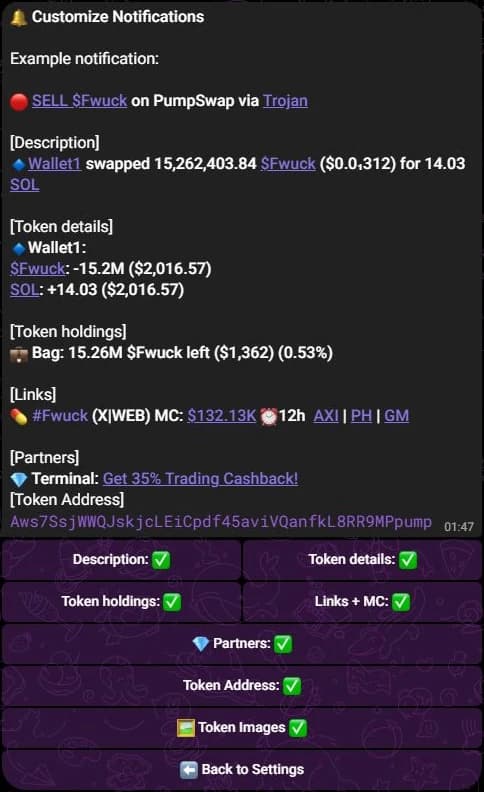
🔔 Customize Notifications switches the wallet line, the amounts per side, the holdings and PnL block, the links line, the token address and the token photo. The header, the transaction link and the buttons stay.
On Discord
The alert is an embed in your private channel, with the same facts laid out as a card:
- The title repeats the header, with the emoji of the side and the trade counter:
🟢 BUY BONK on Jupiter (x2). - The description holds the wallet sentence, then the two legs with their amounts.
- A tag line groups
#BONK, the socials,MC,LIQand the token age. - The token address sits under the tag line in monospace, with the same counter of trades seen by SpyBot.
- Inline links open the transaction, the chart, the explorer and, on Solana, Axiom, Photon and GMGN.
- Buttons under the embed are the BUY and SELL presets and the buy-on buttons. Discord fits five buttons on one row, so an alert carries five at most.
 SpyBotAPP12:49 PM
🟢 BUY MemeWar on PumpFun (x3) via Terminal
🔹 Latuch swapped 0.293333 SOL for 2,983,650.09 MemeWar (@ $0.0₄102)
MemeWar: +2.98M ($30.53)
SOL: -0.315005 (-$32.79)
📊 uPnL: ✅ +$93.92 (+54.38%)
💼 Holds: 26.06M MemeWar ($267.00)

🏷️ #MemeWar · X / WEB · Market cap: $10.23K · ⏰ 16m
Transaction · Token · Market · Axiom · Photon · GMGN
CixLekPGTqUzavPF16idtnBDwP3Kk9oruWf8n5dyh2es (x3)
In the Web Terminal
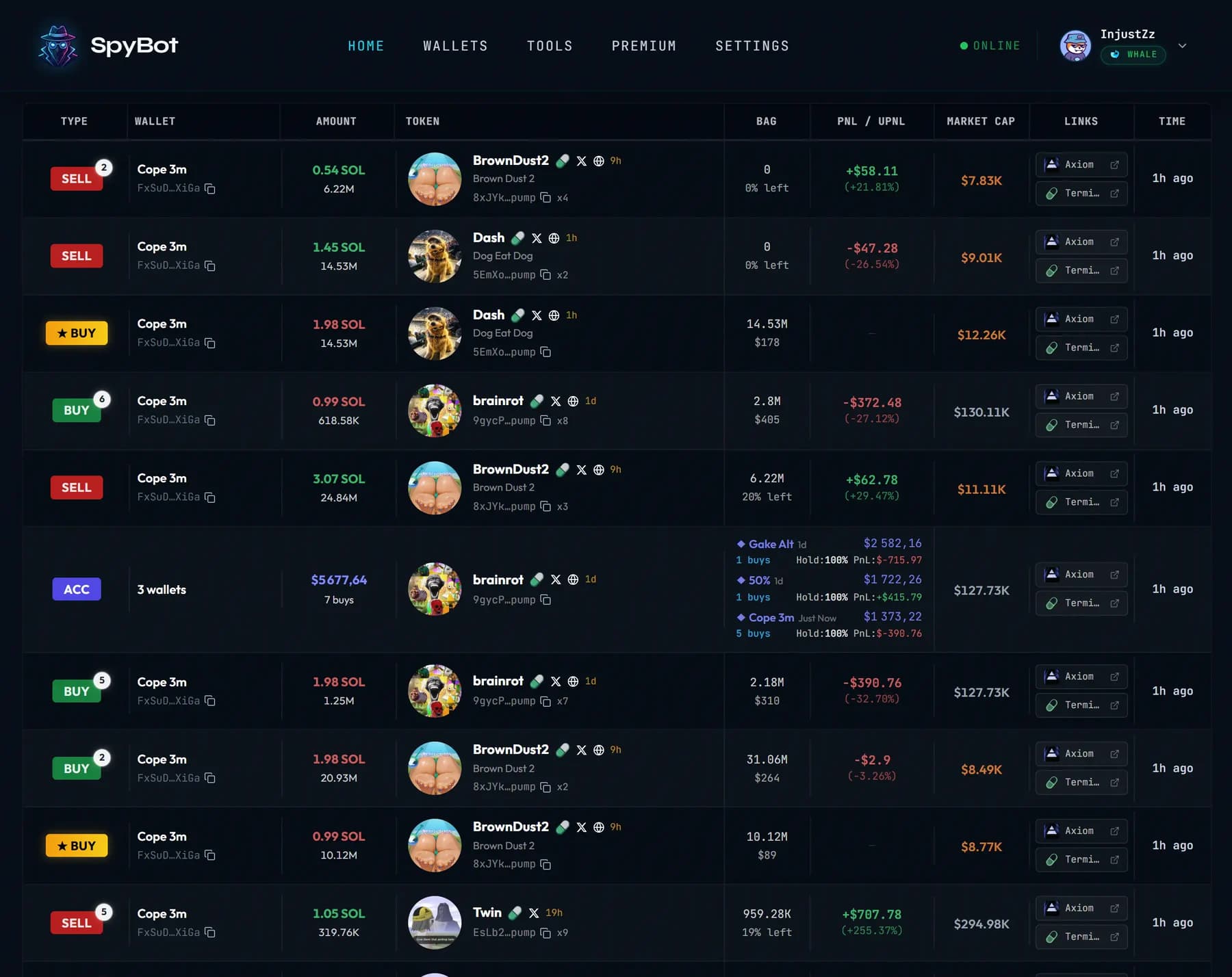
Home lists each alert as a row:
- A type badge:
BUY,SELL,SWAP,IN,OUT,DLMM,MWTand the others. - The wallet name, prefixed by the tracker name for a tracker alert.
- The token, with its image, its launchpad, its socials and its age.
- The amounts on either side of an arrow, the market cap, the liquidity and the time since the alert.
- The holdings, the PnL or uPnL column and the links column.
Click a row to open its details: the full wallet and token lines, the market metrics, the links and, for a Solana token, the trading actions.
On an EVM chain
The alert keeps the same shape and changes a few parts:
- The venue is the protocol:
🟢 BUY BONK on Uniswap V3. - The amounts are the token received and the token paid, in the native coin or an ERC-20.
- The links line reads
MCandLIQwith the pair age, thenDEX | SCAN. - The buy link line opens your trading bot, such as GMGN.
- Buttons open external trading bots. SpyBot does not trade EVM tokens.
- When SpyBot follows the wallet's position on that token, the alert adds a uPnL or PnL line, as on Solana.
A Polymarket alert
An alert from a Polymarket trader on Polygon has its own shape:
- The first line names the move and the outcome,
🟢 BUY Yes on Polymarket, and opens the transaction on Polygonscan. - The wallet line gives the shares, the price in cents and the value:
bought 15.1 Yes at 69¢ for $10.42. 🎯names the market, linked to Polymarket, and🔗 Profileopens the trader's profile. On Discord, Market and Profile buttons open the same pages.- The picture is the image of the market. There is no token address, no holdings line and no trading button.
See Polymarket traders.
Related
- Alert types: every type and the line it shows.
- Notification filters: which moves reach you.
- Buy buttons and trading-bot links.
Last verified on October 28, 2026
Wallet stats
Read the 30-day PnL, median hold time, trading bot and last activity of each tracked wallet in the Web Terminal Wallets table.
Alert types
Every alert SpyBot sends, on Solana, on the five EVM chains and on Polymarket, and the label each type shows on Telegram, Discord and the Web Terminal.