
Notification filters
Choose the transactions that alert you: types, minimum amounts, market cap range, token age, first buys and sells, transfers, chain by chain.
Filters decide which moves of your tracked wallets become alerts. They apply to the whole account, one chain at a time, and a single wallet can carry its own values. Tighten them when a wallet is noisy; loosen them when you follow one trader closely.
Where the filters are
- Press ⚙️ Settings in the main menu.
- Move between chains with ⬅️ and ➡️: 🟣 Solana, 🔷 Ethereum, 🔵 Base, 🟢 Robinhood Chain, 🟡 BNB Smart Chain, 🟪 Polygon.
- Press a switch to flip it. Press Min Trade USD, Max Trade MC or another value to type a new number.
- Open ⚙️ Settings from the menu, or run
/settings. - Press the tab of the chain you want. Each screen keeps the Telegram order and words.
- Press a switch to flip it, or open a threshold to type a value.
- Open Settings.
- Choose the chain at the top of the page.
- Change a switch, or type a value in a range.
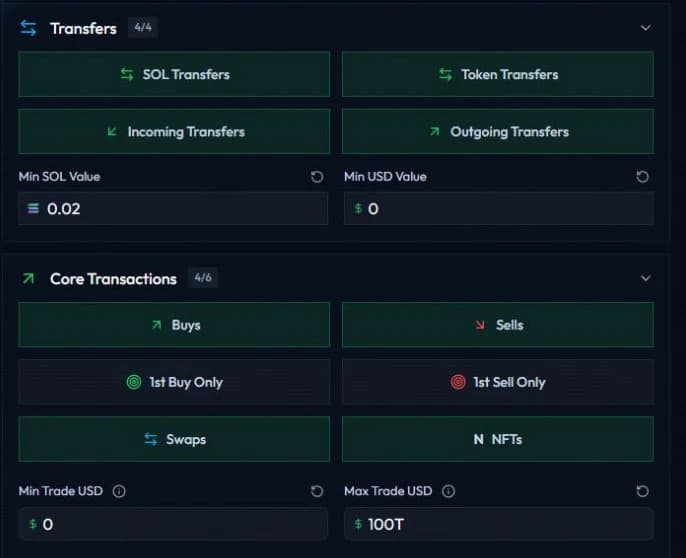
A change saved in one app applies to the account, so the same filters drive Telegram, Discord and the Web Terminal.
The filters
| Filter | What it does | Default |
|---|---|---|
| Buys, Sells, Swaps | Alerts for each trade type. | On |
| 1st Buy Only | Only the first buy of a wallet on a token. | Off |
| 1st Sell Only | Only the first sell of a wallet on a token. | Off |
| NFTs | NFT purchases, sales and listings. | On |
| SOL Transfers | Native SOL moves. | On |
| Token Transfers | SPL token moves. | On |
| Incoming Transfers | Transfers a tracked wallet receives. | On |
| Outgoing Transfers | Transfers a tracked wallet sends. | On |
| Min SOL transfer / Min SOL Value | Smallest SOL transfer that alerts. | 0.02 SOL |
| Min token transfer / Min USD Value | Smallest token transfer that alerts, in USD. | $0 |
| Min Trade USD | Smallest trade that alerts, in USD. | $0 |
| Max Trade USD | Largest trade that alerts, in USD. | No ceiling |
| Min Trade MC | Lowest market cap that alerts. | $0 |
| Max Trade MC | Highest market cap that alerts. | No ceiling |
| Min Token Age / Min Token Age (min) | Youngest token that alerts, in minutes. | 0 |
| Max Token Age / Max Token Age (min) | Oldest token that alerts, in minutes. | No ceiling |
How a value is measured
- The trade amount filters read the USD value of the side the wallet paid, so a buy of $50 passes Min Trade USD at $50.
- The market cap range reads the token the alert is about: the token bought on a BUY, sold on a SELL, and received on a SWAP.
- The token age comes from the creation date of that same token. When SpyBot has no creation date, the age filters leave the alert alone.
Transfers and their direction
- An outgoing transfer is a tracked wallet sending, an incoming transfer is one receiving.
- A transfer between two tracked wallets counts as both, and shows when either side is on.
- A paused wallet never makes a transfer visible.
- Unsolicited token transfers flagged as spam stay hidden, unless you track the sender or switch on 🚫 Spam Transfers. See Advanced and platform filters.
One set per chain
Each chain keeps its own values, so a market cap range on Base never touches your Solana alerts. On the EVM chains the screen shows native transfers and ERC-20 transfers instead of SOL and token transfers, starts both minimum transfer amounts at 0, and adds the DeFi switches described in Advanced and platform filters. Polygon also leads to the 🎯 Polymarket switches, see Polymarket traders.
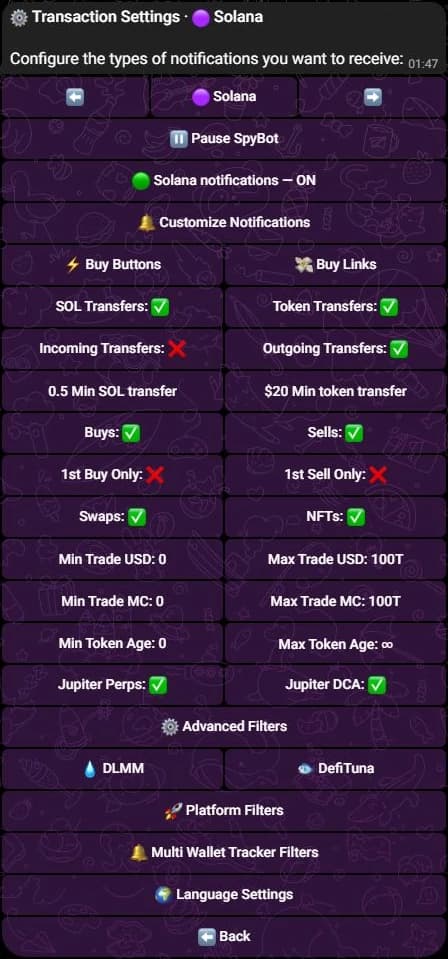
The Solana settings screen on Telegram. These values are an example; your defaults are in the table above.
One wallet can differ
A wallet can override any filter on its own settings screen, and inherit the rest. Open the wallet from your list to see how many values it sets itself and how many it inherits. See Per-wallet settings.
Related
- Advanced and platform filters: creation, fees, bridges, launchpads, DLMM and EVM protocols.
- Quotas and delivery limits: what happens when your alerts are too many.
- Pause alerts.
Last verified on October 28, 2026
Alert types
Every alert SpyBot sends, on Solana, on the five EVM chains and on Polymarket, and the label each type shows on Telegram, Discord and the Web Terminal.
Advanced and platform filters
Create Token, creator fees, cashback, bridges, FOMO bridges, spam, launchpad filters, Meteora DLMM, DefiTuna and the EVM protocol filters.