
Plans and limits
Every SpyBot plan with its price in SOL, wallet limits, alert quotas, tracker slots and daily tool runs.
SpyBot starts on a free plan and works the same way on every paid plan. Paid plans raise the number of wallets you track, the alerts you receive and the slots your trackers use. All prices are in SOL, paid from your in-app wallet.
Prices and tracking limits
| Plan | Per month | Per year | Solana wallets | EVM addresses | Alerts per hour | Alerts per day |
|---|---|---|---|---|---|---|
| Free | free | free | 10 | 10 | 100 | 1,000 |
| Crab | 0.1 SOL | 0.6 SOL | 50 | 30 | 400 | 5,000 |
| Fish | 0.15 SOL | 0.9 SOL | 100 | 60 | 600 | 10,000 |
| Dolphin | 0.3 SOL | 1.8 SOL | 200 | 125 | 600 | 10,000 |
| Shark | 0.6 SOL | 3.6 SOL | 500 | 250 | 800 | 15,000 |
| Whale | 1.1 SOL | 6.6 SOL | 1,000 | 500 | 1,200 | 20,000 |
A year costs the same as six months. An EVM address counts once, whichever of the five EVM chains it is tracked on. The two counts are separate: Crab allows 50 Solana wallets and 30 EVM addresses at the same time.
Trackers, alerts and tools
| Plan | Multi-Wallet Tracker slots | Members in total | Holding Tracker wallets | Active price alerts | Runs per day, per tool |
|---|---|---|---|---|---|
| Free | 1 | 30 | 1 | 3 | 2 |
| Crab | 2 | 60 | 5 | 10 | 5 |
| Fish | 3 | 100 | 10 | 20 | 10 |
| Dolphin | 3 | 100 | 10 | 50 | 25 |
| Shark | 4 | 150 | 25 | 100 | unlimited |
| Whale | 5 | 250 | 100 | 200 | unlimited |
Each Multi-Wallet Tracker slot has its own member limit: 30 wallets in the first slot, 30 in the second, 40 in the third, 50 in the fourth and 100 in the fifth. That is where the totals come from.
Runs per day are counted per tool. Token Scanner, Dex Checker, PnL Checker, Top Holders and Wallet Finder each have their own daily counter, and the three apps share it: a Token Scanner run from Telegram uses one of your Token Scanner runs in the Web Terminal too. These figures are the current defaults; they can change from the admin, and the menus always show the live values.
What the Free plan includes
- 10 Solana wallets and 10 EVM addresses.
- 100 alerts an hour and 1,000 alerts a day.
- One Multi-Wallet Tracker slot with up to 30 member wallets.
- One Holding Tracker wallet.
- 3 active price alerts.
- 2 runs a day of each research tool.
- Every alert type and every supported chain, within those quotas.
- Solana trading from your in-app wallet.
The Top Traders lists open by plan: Crab sees Institutional, Fish adds KOL, Dolphin adds Whale, Shark adds High ROI and Whale sees every category.
See your current plan
- Press 💎 Premium in the main menu, or send
/upgrade. - The first line reads 💎 Your plan: followed by the tier and the days left.
- The same screen shows the SOL balance and the address of your in-app wallet.
- Press 💎 Premium in the menu, or type
/premium. - The line under the title reads Your plan: with the tier, the days left and the end date.
- Your subscription wallet address and its balance sit under the plan table.
- Sign in at app.spybot-tracker.com and open Premium in the navigation.
- The Subscription Plan card shows your tier and the days left.
- The In-App Wallet card shows the address and the SOL balance used for purchases and trading.
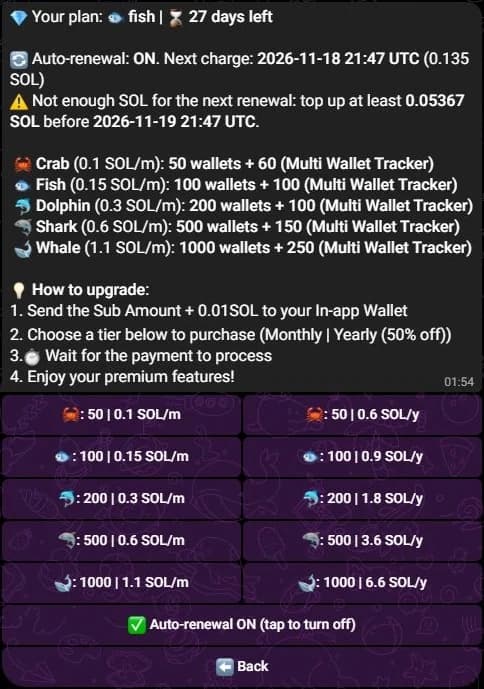
The wallet address and its balance appear under the upgrade steps. They are hidden here.
When a plan ends
A plan runs until its end date. After that date, SpyBot puts the account back on Free:
- Wallets above the Free limit are paused, not deleted. Resume the ones you need once you upgrade again.
- Multi-Wallet Tracker slots above the first are turned off.
- Holding Tracker wallets above the Free limit stop being checked.
- Tool runs fall back to 2 a day for each tool.
To keep the same limits, renew before the end date: see Upgrade and pay in SOL.
Related
Last verified on October 28, 2026
Communities page
Run a Discord server workspace from the Web Terminal: the channel, delivery, shared wallets, community trackers, the plan and the recent activity.
Upgrade and pay in SOL
Pay for a SpyBot plan in SOL from your in-app wallet, extend it 30 days at 10% off, or turn on automatic monthly renewal.