
Trading settings
Set your presets and slippage for all three apps, then choose which trading buttons appear under your alerts on each one.
Two kinds of settings drive in-app trading: the ones every app shares, and the buttons each app shows under its alerts.
| Setting | Where it applies |
|---|---|
| Buy and sell slippage | Shared: one value for Telegram, Discord and the Web Terminal |
| The five buy amounts and five sell percentages of the trade panel | Shared |
| BUY and SELL buttons under alerts | Per app: each one keeps its own |
A change to a shared setting applies to the other apps the next time you open that screen.
Slippage
Slippage is the price difference SpyBot accepts between the quote and the fill. The default is 33%, and the range is 1% to 500%.
- 1% to 5% suits liquid tokens.
- 10% to 20% suits most tokens.
- 30% and above suits low liquidity and volatile tokens.
A low slippage fails more often but gives a tighter price. A high slippage fills more often and can fill far from the quote.
Open ⚡ In-App Trading, press ⚙️ Settings, then ⚙️ Slippage Configuration. The screen shows 🟢 Buy Slip and 🔴 Sell Slip, each with its own button to change the value.
Open /trade and press Settings. The form holds Buy slippage % (1–500) and Sell slippage % (1–500) next to the five buy amounts and five sell percentages.
Open Trading and scroll to Settings. Buy slippage (%) and Sell slippage (%) sit above Panel amounts. Press Save. Saving from the Web Terminal needs an authorized device.
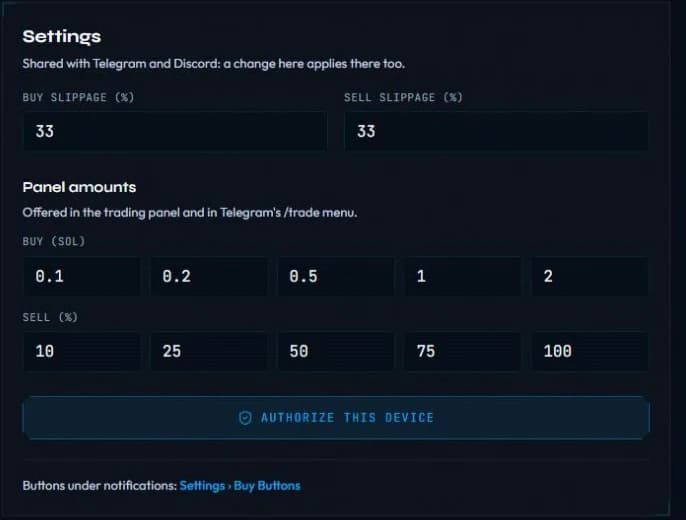
The trade panel amounts
Each app offers five buy amounts and five sell percentages in its trade panel. They are the same five everywhere, so editing them on one app changes the other two.
Defaults are 0.1, 0.2, 0.5, 1 and 2 SOL for buys, and 10, 25, 50, 75 and 100% for sells.
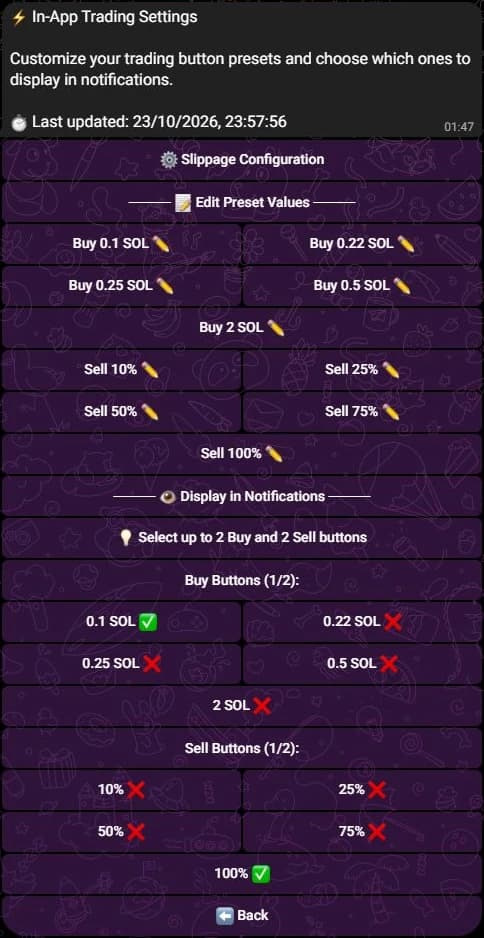
- Telegram: ⚙️ Settings, then the Buy 0.1 SOL ✏️ and Sell 100% ✏️ buttons of Edit Preset Values.
- Discord: Settings on the Trade screen, in the form fields 5 buy amounts in SOL, separated by spaces and 5 sell percentages, separated by spaces.
- Web Terminal: Panel amounts in Settings, then Save.
Buttons under alerts
Each app decides which of those values become buttons under an alert. The buttons trade at once, so keep only the amounts you are ready to spend. See Buy buttons under alerts.
- Open ⚙️ Settings in the bot, then ⚡ Buy Buttons. The next screen, 🔔 Customize Trading Bot Buttons, lists your bots and the SpyBot switch.
- Check that ⚡ SpyBot Trading (In-App Wallet) is on. Press it to toggle; when it is off, no SpyBot BUY or SELL button appears under your alerts.
- Back in ⚡ In-App Trading, open ⚙️ Settings and use the buy and sell toggles of Display in Notifications, marked with a check or a cross. Up to 2 BUY and 2 SELL buttons can be on.
Trying to enable a third on one side answers ❌ Maximum 2 Buy buttons. Disable one first.
- Open
/tradeand press Notification buttons. - Press a preset to switch it on or off. An enabled preset carries a check mark.
- Up to 5 buttons show on one row, with at most 3 BUY and 3 SELL. Edit values changes the five values, Trading bots adds the buy buttons of your external bots on the same row.
The default row is BUY 0.1 SOL, BUY 0.25 SOL, BUY 1 SOL, SELL 50% and SELL 100%.
- On the Trading page, follow Buttons under notifications: to Settings, then Buy Buttons.
- Set up to five values per side and switch on up to 3 per side.
- Press Save.
The Web Terminal keeps these buttons for itself: Telegram and Discord keep their own. The defaults are Buy 0.1, Buy 0.25, Sell 50% and Sell 100%. Turning SpyBot trading off in Telegram also removes the web defaults.
Priority fee
There is no priority fee setting. SpyBot reads recent network fees before each order and attaches its own: a medium level for Jupiter swaps, a high level for Pump.fun and PumpSwap trades. On a buy, plan about 0.01 SOL on top of the amount for those fees and for the temporary accounts the swap creates.
Related
Last verified on October 24, 2026