
Referral program
Share your SpyBot link, earn 15%, 20% or 25% of every subscription your referrals pay, for life, in SOL.
You earn a share of every subscription the accounts you invite pay, for as long as they keep paying. The share grows with the number of accounts you referred: 15%, then 20%, then 25%. It is paid in SOL, straight to your in-app wallet, with nothing to claim.
Your link and your code
Every account has one referral code. Your link is the SpyBot bot address with that code after ?start=:
https://t.me/wallet_tracker_solana_spybot?start=YOURCODE- Press 🎁 Referrals in the main menu.
- Copy the link under Share your unique referral link.
- Friends who open it and press Start are attached to you when they create their account.
- Press 🎁 Referrals in the menu, or type
/referrals. - The screen shows the same Telegram link and a 6-character code.
- A friend on Discord enters that code in 🎁 Referrals then 🎟️ Enter referral code. Installing the bot alone does not count.
- Open Settings, then Referral Program.
- Press the copy button next to Your referral link:.
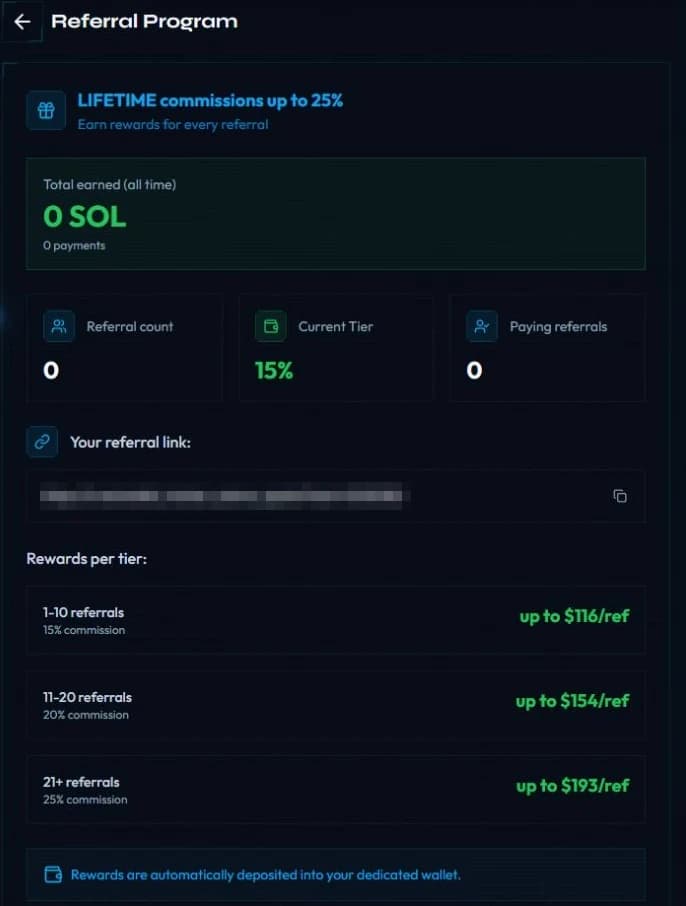
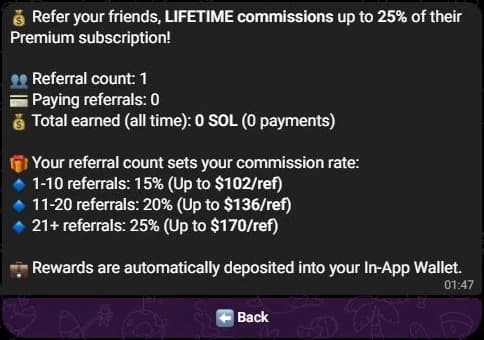
Your personal link appears under Share your unique referral link. It is hidden here.
What you earn
| Referred accounts | Share of each payment |
|---|---|
| 1 to 10 | 15% |
| 11 to 20 | 20% |
| 21 and more | 25% |
The rate is read when a referral pays, from the number of accounts linked to your code at that moment. From the 11th referred account, each new payment pays 20%, and from the 21st, 25%.
Every payment counts, not only the first one: a new plan, an extension and an automatic renewal each pay your share again.
How you are paid
- The share leaves the payment itself: part of the SOL your referral sends to SpyBot goes to your in-app wallet in the same transaction.
- Payment is in SOL. There is nothing to claim and no request to send.
- You need a subscription wallet. Create it in 💎 Premium on Telegram, or with Create subscription wallet on Discord, before your referrals buy. Without one, no commission is paid.
- Your payout history is kept for life, one record per payment, with its transaction signature.
One referrer per account
An account links to one referrer and cannot change it. Your own code is refused. On Discord, an account that is linked to Telegram manages its referrer from that Telegram account.
Where to see your earnings
Press 🎁 Referrals. The screen shows your referral count, your paying referrals, and Total earned (all time) with the number of payments.
Press 🎁 Referrals or type /referrals. The Your stats block shows your referrals, paying referrals, current rate and total earned. The tiers mark yours with ◀ you, and Payouts lists your recent commissions with links to Solscan.
Open Settings, then Referral Program. The page shows Total earned (all time) with the number of payments and the date of your first commission, then Referral count, Current Tier, Paying referrals and your link.
The totals are payment records, not your wallet balance. Spend or move SOL from the wallet and the earnings history stays the same.
Related
Last verified on October 24, 2026
Upgrade and pay in SOL
Pay for a SpyBot plan in SOL from your in-app wallet, extend it 30 days at 10% off, or turn on automatic monthly renewal.
Discord community plans
Starter, Pro and Max for a Discord server: wallets, alerts per hour and per day, the SOL price per month and per year, and how a purchase extends or replaces a plan.