
Holding Tracker
Alert when a tracked wallet still holds what it bought after the delay you set. Checked every 5 minutes, on Solana.
The Holding Tracker tells you when a wallet you track buys a token and still holds most of it after a set time. Use it to separate wallets that keep a position from wallets that sell within minutes.
How it decides
SpyBot checks your Holding Tracker wallets every 5 minutes. For each recent buy, it compares the position the wallet still holds with what it bought.
- The position must be at least Holding Time old, from 5 to 1,440 minutes.
- The wallet must still hold at least Min Hold % of what it bought, from 1% to 100%.
- Stablecoins and SOL never trigger a Holding alert.
The alert names the token, how long the wallet has held it and the share still held.
Holding time: 30 minutes · Min hold: 50%
Wallet buys a token
10:00
Check
After 10:30, at the next 5-minute run
Still holds 80%: alert
80% is at least your 50% minimum.
Still holds 20%: no alert
20% is below your 50% minimum.
Settings
| Setting | Default | Range |
|---|---|---|
| Holding Time | 5 minutes | 5 to 1,440 minutes (24 hours) |
| Min Hold % | 50% | 1% to 100% |
Wallets by plan
| Plan | Wallets |
|---|---|
| Free | 1 |
| Crab | 5 |
| Fish | 10 |
| Dolphin | 10 |
| Shark | 25 |
| Whale | 100 |
Set it up
- Press ⏰ Holding Tracker in the main menu.
- Press ➕ Add Wallets and send the addresses, one per line.
- Press ⏰ Holding Time: 5 minutes, then a preset from 5 min to 24 hours, or 🔧 Custom.
- Press 📊 Min Hold: 50%, then a preset percentage, or 🔧 Custom.
- Press Holding Tracker: ❌ OFF to switch it on.
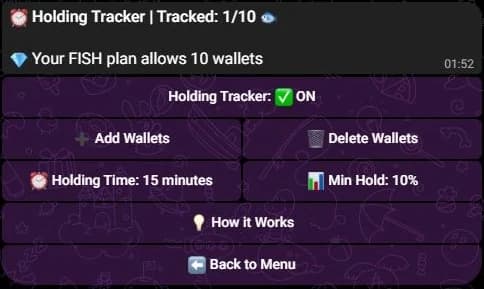
Tracked wallets are listed under the title. They are hidden here.
- Type
/holding-config viewto read the saved values. - Change one with
/holding-config set key:holdingTimeMinutes value:30or/holding-config set key:minHoldingPercentage value:50. - Add wallets with
/holding-wallet add, then switch the tracker on with/holding-control set state:on.
- Open Tools, then Holding Tracker under Tracking.
- Press Add Wallet and paste the addresses.
- Press Configure in the Configure Holding Tracker window, set the holding time and the minimum percentage, then save.
- Switch the tracker on with its toggle.
What the check sees
The check reads the buys of the last 6 hours. A position is followed from its first buy in that period, and it is dropped once that first buy is more than 6 hours old.
Keep the holding time under 6 hours
The setting accepts up to 1,440 minutes, but a position is no longer examined after 6 hours. A holding time above 360 minutes has no chance to fire. Use 6 hours or less.
Each wallet and token pair is examined once. After that check, it is not examined again, whether the alert was sent or not. Only buys on Solana are read, and the share held is measured against the total bought in the same 6 hour period.
Related
- Accumulation alerts for buys spread over several wallets.
- Multi-Wallet Tracker for wallets buying together.
- Wallets to add the addresses you follow.
Last verified on October 24, 2026