
Upgrade and pay in SOL
Pay for a SpyBot plan in SOL from your in-app wallet, extend it 30 days at 10% off, or turn on automatic monthly renewal.
Plans are paid in SOL, from your own SpyBot wallet to SpyBot. Keep the price plus 0.01 SOL in that wallet: the extra 0.01 SOL pays the network fee of the transfer. A monthly plan lasts 30 days, a yearly plan lasts 365 days, and a year costs the same as six months.
One wallet covers plans and trading. Telegram and the Web Terminal call it In-App Wallet, and Discord calls it Subscription wallet.
The wallet pays, the key owns
Payments leave your in-app wallet. Anyone who has its private key controls the SOL left in it. Keep the key to yourself and never paste it into a site or a bot that asks for it. See Security best practices.
Pay for a plan
- Press 💎 Premium in the main menu, or send
/upgrade. - Send at least the plan price plus 0.01 SOL to the wallet address shown in the message. The screen lists your current balance and your wallet address.
- Choose a tier and a period. Each tier has two buttons, for example
🦀: 50 | 0.1 SOL/mand🦀: 50 | 0.6 SOL/y. - SpyBot sends the payment and confirms the new tier, for example ✅ You have successfully upgraded to crab tier (monthly plan)!
- Type
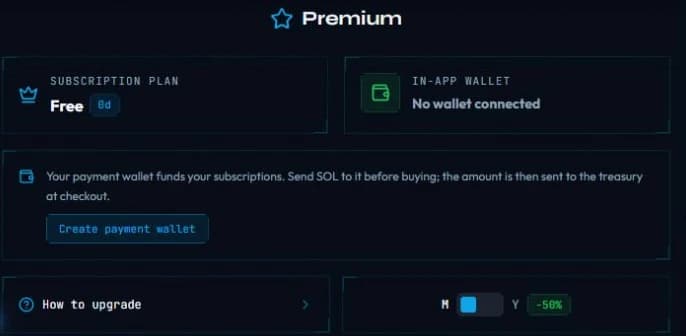
/premium. - If the screen says the wallet is missing, press Create subscription wallet, then fund it with SOL on Solana.
- Pick Monthly or Yearly, then press the plan button, for example 🦀 Crab · 0.1 SOL.
- The screen confirms ✅ Premium activated. and shows the new end date.
- Sign in at app.spybot-tracker.com, open Premium.
- Switch Monthly or Yearly, then press Subscribe Now on the plan you want.
- The purchase window names the amount, the 0.01 SOL network reserve and your balance: ✓ Sufficient, or ✗ Need 0.05 SOL more with a Deposit Required notice.
- Confirm the purchase and wait for the confirmation. The plan starts as soon as the transfer lands.
If the payment is refused
The three apps stop before sending anything when the balance is too low:
- Telegram:
❌ Insufficient funds. You need a minimum of 0.11 SOL in your subscription wallet for this purchase. - Discord: ⚠️ Insufficient SOL. Fund the wallet with the price plus 0.01 SOL, then refresh.
- Web Terminal: Insufficient Balance, with the missing amount.
Add SOL to the wallet and try again. A payment that reached the network but came back unconfirmed is verified on chain before any second charge: Discord shows ⏳ Payment is being verified. Another purchase is blocked. Refresh to check its status; do not pay again elsewhere.
Where your wallet address is
- Telegram: 🔐 My Wallet shows the public key and the SOL balance. 🔑 Show Private Key exports the key.
- Discord: the 💎 Premium screen prints the subscription wallet address under the plan table.
- Web Terminal: the In-App Wallet card on Premium holds the address, a copy button and the balance.
Extend 30 days at 10% less
When a plan is close to its end date, SpyBot offers to add another 30 days at the monthly price minus 10% instead of a full new purchase.
- Press 💎 Premium.
- Press ♻️ Extend current plan (+30 days) - 0.09 SOL (-10%). With one day or less left, the same button reads ♻️ Renew.
- The new period starts at the current end date, so paying early never shortens the plan.
- Type
/premium. - Press Extend −10% · 0.09 SOL under the plan buttons.
- Open Premium.
- In the Extend Crab Plan card, whose title carries your own plan name, press Extend Now & Save 10%.
Telegram and Discord show the button from 26 days left or fewer. The Web Terminal offers the same renewal while 30 days or fewer remain.
While automatic renewal is on, Telegram hides the Extend button: the renewal charges the same month at the same price.
Changing tier
A different tier starts a new period from today, and the days left on the current plan are not credited. To change tier on purpose, buy the new one. To add time on the same tier, use Extend.
Automatic monthly renewal
SpyBot can renew your plan for you, every month, from your in-app wallet. The setting exists on Telegram and in the Web Terminal. Discord has no automatic renewal.
What a renewal does:
- It charges the monthly price of your current tier minus 10%, plus the 0.01 SOL network reserve, from your in-app wallet.
- It runs about 24 hours before the end date, and the new 30 days start at the current end date.
- It sends one payment at a time: a second charge waits until the first one is confirmed on chain.
- Press 💎 Premium. The renewal line under your plan reads 🔄 Auto-renewal: OFF or 🔄 Auto-renewal: ON with the next charge date in UTC.
- Press 🔄 Turn on auto-renewal (0.09 SOL/month) to turn it on, or ✅ Auto-renewal ON (tap to turn off) to turn it off.
- Keep at least the discounted price plus 0.01 SOL in the wallet.
- Open Premium.
- In the Auto-renewal card, use the switch to turn it on or off.
- The card shows the amount, the next charge date and the wallet that will be charged.
Turning it off stops the next automatic charge. The current plan keeps running until its end date.
Without enough SOL
The renewal only runs when the wallet holds the amount plus the reserve. SpyBot starts warning 3 days before the end date, for example ⚠️ Not enough SOL for the next renewal: top up at least 0.02 SOL before 2026-11-02 09:00 UTC. Nothing is charged, the plan ends at its end date, and the account returns to Free with wallets paused above the Free limit. No automatic charge starts in the last 15 minutes before the end date.
Related
Last verified on October 24, 2026