
Trade any token
Open a SpyBot trading panel from a token address or your holdings on Telegram, Discord or the Web Terminal, and choose your own amount.
A trade panel works on any Solana token, whether or not a wallet you track bought it. Use it for an address you found elsewhere, or to sell something you already hold.
Steps
- Send
/tradeand paste a token address when asked, or send/tradewith the address in one message. You can also open ⚡ In-App Trading and press 📈 Trade. - The panel shows the token: name, holders, bonding progress on a launch, links, and your position when you hold some.
- Press one of the five BUY amounts or one of the five SELL percentages. A preset runs at once.
Defaults are BUY 0.1 SOL, BUY 0.2 SOL, BUY 0.5 SOL, BUY 1 SOL, BUY 2 SOL, and SELL 10%, SELL 25%, SELL 50%, SELL 75%, SELL 100%. ⚙️ changes these five values, 🔄 Refresh reads the panel again.
- Type
/tradeand fill the token option with a Solana address, or open/tradeand press Enter token. - The screen shows your wallet, its balance, the BUY and SELL slippage in use, and the token.
- Press a preset, or BUY X SOL or SELL X% to type your own value.
Presets execute at once. The two custom buttons open a form first, then a review message with one button that sends the order.
- Open Trading and find the token in Holdings, then press Trade or Sell. The Trade button under a feed row opens the same panel.
- Choose Buy or Sell, then an amount: a preset, or Other amount and Other %.
- Check the estimate, the price impact and SOL needed, then press Buy for 0.1 SOL or Sell 50%.
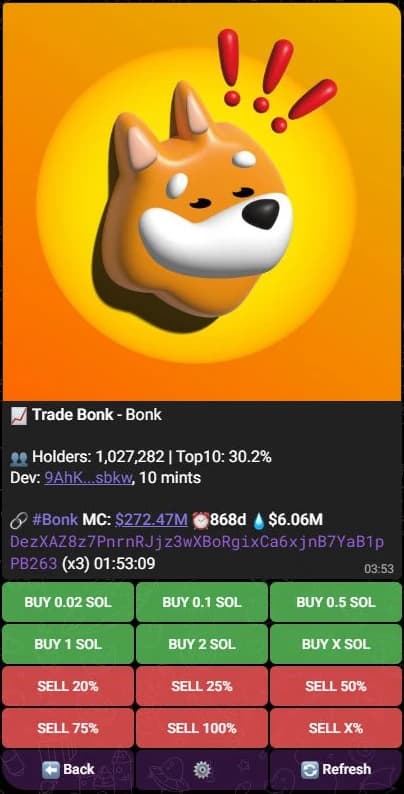
The amounts on the buttons are your presets. Nothing trades until you press one.
Custom amounts
| Minimum | Maximum | |
|---|---|---|
| Buy | 0.01 SOL | 1,000,000 SOL |
| Sell | 1% | 100% |
A buy is an amount of SOL. A sell is a share of the tokens the wallet holds at that moment, so SELL 50% sells half of the current balance.
On Telegram, BUY X SOL asks for the amount, then shows 🟢 Confirm Buy Order with the token and the amount, and waits for ✅ Confirm Buy or ❌ Cancel. SELL X% follows the same two steps.
What the panel tells you
- Telegram: holders and top 10 share, bonding curve progress before a launch, dev history, social links, market cap, and your position with Hold, Bought, Sold, Avg MC, PnL and uPnL.
- Discord: the wallet and its balance, the BUY and SELL slippage, the token and your token balance, plus Wallet, Settings and Notification buttons.
- Web Terminal: Amount in SOL or Share to sell, Slippage with Edit, SpyBot fee (1%), Network reserve, SOL needed, You receive about, and the price impact.
How the order is routed
SpyBot picks the route that fits the token: the Pump.fun bonding curve, PumpSwap once the token has a pool, or Jupiter for everything with a market. If no route works, because the token left its bonding curve or has no pool, the app says so and your wallet keeps its SOL.
While another order is pending
The wallet handles one operation at a time. If an order is still confirming, a new one is refused: Telegram keeps the panel open, Discord reports that an order is already pending, and the Web Terminal names the app that started it. Wait for the receipt or the failure, then try again. See Order statuses and errors.
Related
Last verified on October 24, 2026