
Display options
Choose the lines an alert carries, from the summary and the position block to the token address, the image, and the gas and market data of an EVM chain.
🔔 Customize Notifications decides which lines an alert carries. Use it to shorten a busy feed on a phone, or to bring back the market cap, the gas fee or the token image. The switches change the layout only: what you track and how often an alert arrives stay the same.
What every alert keeps
The title line with its transaction link, the wallet names as links, and the trading buttons stay, whatever you switch off.
On Solana
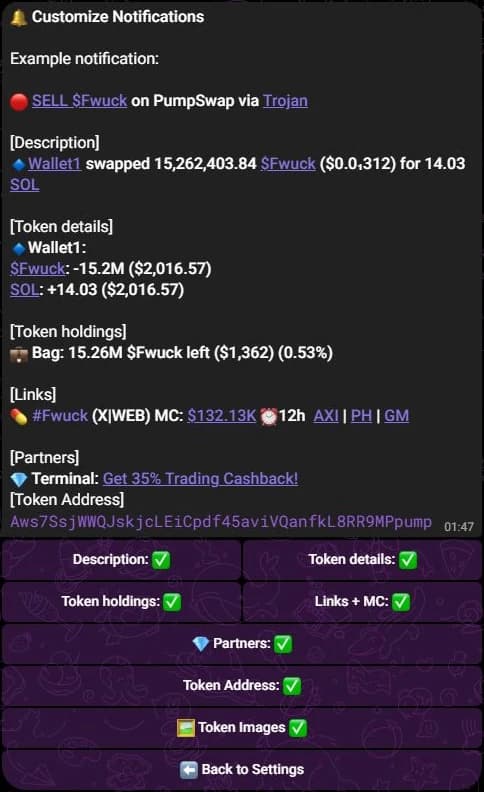
| Switch | Shows or hides | Default |
|---|---|---|
| Description | The line naming the wallet and what it swapped, sent or received, with the value. | On |
| Token details | The amount and value of each token in the transaction. | On |
| Token holdings | What the wallet still holds of that token, its value and its PnL. | On |
| Links + MC | The hashtag line with the market cap, the token age, the socials, and the DEX and explorer links. | On |
| 💎 Partners | The partner line. Alerts do not add it in the current build, so the switch moves the example only. | On |
| Token Address | The token mint to copy, at the end of the alert. | On |
| 🖼️ Token Images | The picture sent with the alert. | On |
On Telegram the screen also shows an example notification above the switches, and it follows each change.
On the EVM chains
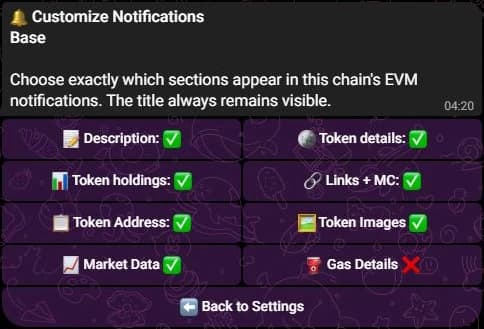
Ethereum, Base, Robinhood Chain, BNB Chain and Polygon each have their own screen, named with the chain. It holds eight switches:
| Switch | Shows or hides | Default |
|---|---|---|
| 📝 Description | The summary line: the wallet, the amounts and the pair of a trade, the sender and receiver of a transfer, the allowance of an approval, or the number of NFTs. | On |
| 🪙 Token details | The breakdown under it: each side with its amount and USD value, both sides of a transfer, the spender of an approval, or up to eight NFTs with their id. | On |
| 📊 Token holdings | The position block: uPnL, the amount held and its value after a buy; the sold share, the realized PnL and what remains after a sell. | On |
| 🔗 Links | The 🔗 line with the hashtag, the socials, and the DEX and explorer links. | On |
| 📋 Token Address | The contract address, with (x2) when several tracked wallets hold that token. | On |
| 🖼️ Images | The picture of the token or the NFT sent with the alert. | On |
| 📈 Market Data | The market cap, the liquidity and the token age in the 🔗 line, and the unit price in the description. | On |
| ⛽ Gas Details | The ⛽ Gas line with the fee the wallet paid, in the native coin and in USD. | Off |
📈 Market Data and 🔗 Links share one line. With Market Data on and Links off, the market figures still print, without the DEX and explorer links. With Links on and Market Data off, the links print alone.
⛽ Gas Details only appears when the tracked wallet paid the fee, so a transfer it received carries no gas line.
On a Polymarket alert, 📝 Description hides the sentence, 🔗 Links hides the market and the trader's profile, and 🖼️ Images hides the image of the market. The other switches have nothing to hide there. See Polymarket traders.
Where the switches are
- Press ⚙️ Settings.
- Choose the chain with ⬅️ and ➡️.
- Press 🔔 Customize Notifications.
- Press a switch to flip it.
- Open ⚙️ Settings and pick the chain tab.
- Press 🔔 Customize Notifications.
- The Display switches screen lists them. Editing needs the display permission that the owner of the SpyBot account grants from
/discord; without it the screen stays read-only.
- Open Settings.
- On Solana, open Notification Display. On an EVM chain, choose the chain, then open Notification Display & Protection.
- Press a switch.
The Web Terminal names some switches differently. Solana shows six buttons: Transaction summary, Token details, Position & PnL, Token links, Token address and Token images. An EVM section adds Market data, Gas fees and Anti-spam.
One wallet can differ
A tracked wallet can keep its own display choices, and a wallet without overrides follows the account. See Per-wallet settings.
What these switches leave alone
The Multi-Wallet Tracker, Accumulation alerts, the Holding Tracker and price alerts keep their own layout. A line you switch off still delivers its alert, with fewer lines, on all three apps.
Related
- Notification filters: which transactions alert you at all.
- EVM filters and protocol groups: the EVM chain screen in full.
- Anatomy of an alert: each line in place.
- Language: the language of those lines.
Last verified on October 28, 2026
EVM filters and protocol groups
Set what an EVM chain alerts on, from transfers and trades to approvals, DeFi activity and spam, and pick the protocol groups of that chain.
Language
Switch SpyBot between English, French, Spanish, Russian and Chinese on Telegram, Discord and the Web Terminal, and choose what gets translated.