
Top Traders
Browse curated smart-money wallets by category, see which plan unlocks each list, and add one to your tracked wallets.
Top Traders gathers wallets that other traders watch: institutions, KOLs, whales and wallets with a high return. Browse a list and follow the addresses that fit your strategy.
Categories
| Category | What it holds | Unlocked from |
|---|---|---|
| Institutional | Exchange and fund wallets. | Crab |
| KOL | Wallets of traders known in the memecoin space. | Fish |
| Whale | Large wallets with a high profit and loss. | Dolphin |
| High ROI | Wallets with a high return on investment. | Shark |
A Whale plan opens every category. A locked category stays visible with a lock and names the plan it needs.
What a list shows
Each row is a wallet name and its address. KOL names link to their X profile when the handle is known, and KOL rows on the Web Terminal show the X verified badge.
- Ten wallets per page on Telegram and Discord. The Web Terminal lets you search and sort.
- Institutional and KOL lists are sorted by name, Whale by profit and loss, High ROI by address.
- The category menu shows how many wallets each list holds.
Track a wallet from the list
- Press 🏆 Top Traders Wallets in the main menu.
- Open a category, then page through the list with ⬅️ and ➡️.
- Press an address to copy it, then send it with
/add.
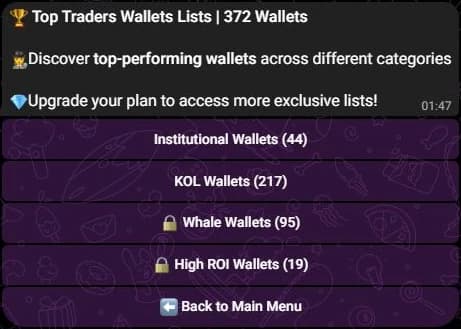
- Press 🏆 Top Traders Wallets in the main menu, or type
/top-traders. - Open a category and page through it with the navigation buttons.
- Copy the address, then add it with
/wallet add.
- Open Tools, then Top Traders Wallets under Discovery.
- Open a category, then search or sort the list.
- Press Track on a row. The button turns to Tracked, and the wallet joins your tracked wallets.
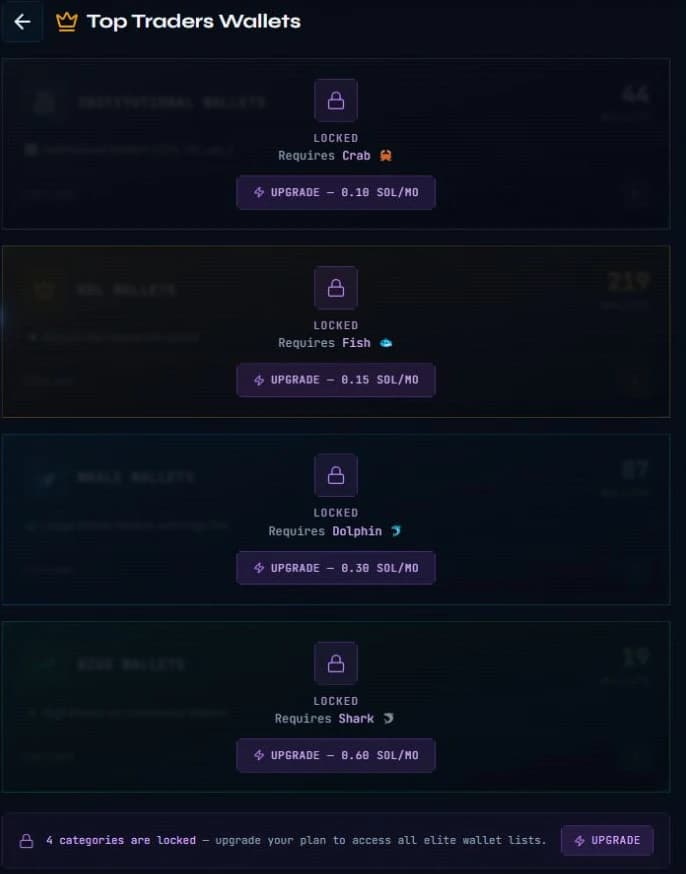
On the Free plan every list is locked and names the plan that opens it.
On Telegram and Discord the lists are read-only, so a wallet is added by copying its address. The Web Terminal adds it for you with Track.
Wallets and plan limits
A tracked wallet counts towards your plan's wallet limit. If the limit is reached, remove a wallet you no longer need or upgrade your plan.
Related
- Tools and daily allowance for the other research tools.
- Wallets to add addresses in bulk.
- Plans for the wallet limit of each plan.
Last verified on October 24, 2026