
EVM tokens: quick-buy links
Turn on the GMGN link and the quick-buy buttons of each EVM trading bot, chain by chain, on Telegram, Discord and the Web Terminal.
An EVM alert can end with a way to buy the token in a trading bot you already use. Two settings per chain control it: 💸 Buy Links writes the URL inside the alert, and ⚡ Buy Buttons adds a button under it. SpyBot does not trade EVM tokens itself: the button opens the bot, and the trade happens in your account there.
Defaults
GMGN is the only link on by default, on Ethereum, Base, Robinhood Chain and BNB Chain. Every quick-buy button starts off, so an EVM alert carries one link line and no button until you choose.
Bots per chain
| Chain | Buttons | Links |
|---|---|---|
| Ethereum | GMGN, Banana Gun, Terminal, Bloom | GMGN, Banana Gun, Terminal |
| Base | GMGN, Banana Gun, Terminal, Bloom | GMGN, Banana Gun, Terminal |
| Robinhood Chain | GMGN, Terminal, Axiom, Maestro, Sigma, Bloom | GMGN, Terminal, Axiom |
| BNB Chain | GMGN, Banana Gun, Terminal, Axiom, Bloom | GMGN, Banana Gun, Terminal, Axiom |
Maestro, Sigma and Bloom offer a button only, with no link.
Polygon has no trading bot: its alerts carry no link and no button, and its settings have no ⚡ Buy Buttons or 💸 Buy Links row.
What appears under an alert
- A button reads ⚡ Buy on GMGN and opens that bot on the token.
- At most two buttons, on one row. With more switched on, SpyBot shows the first two in this order: GMGN, Banana Gun, Terminal, Axiom, Maestro, Sigma, Bloom.
- Buttons and links appear under a BUY, a SELL or a SWAP of a token. A native coin transfer and an NFT alert carry none.
- A link line reads
⚡ GMGN: https://...and sits at the end of the alert. It helps on a device where the buttons cannot be tapped.
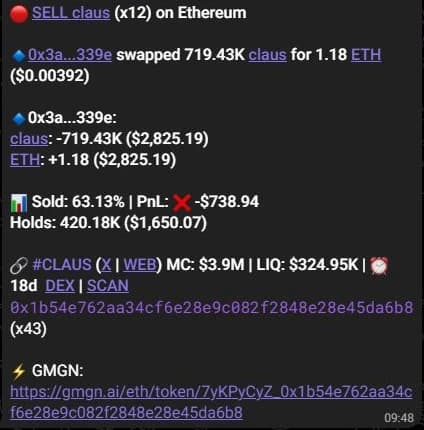
An Ethereum alert with the default settings: the GMGN link line at the end and no button yet. The token picture above the alert is left out here.
Turn them on
- Press ⚙️ Settings, then choose the chain with ⬅️ and ➡️.
- Press ⚡ Buy Buttons or 💸 Buy Links.
- Press a bot to switch it. The buttons screen says Choose up to two trading shortcuts displayed below each trade notification.
- Open ⚙️ Settings and pick the chain tab (🔷 ETH, 🔵 BASE, 🟢 RH, 🟡 BSC).
- Press ⚡ Buy Buttons.
- Select the bots. Discord keeps one list per chain and turns your choices into ⚡ Buy on ... buttons, up to five.
SpyBot keeps the Telegram limit on that list: a chain cannot carry more than two buttons, so it refuses a choice that would become a third.
- Open Settings and choose the chain.
- Press Buy Buttons or Buy Links.
- Select the bots. The buttons page counts your choices against the two allowed, and the links page lists the ones already on.
Limits worth knowing
- The chain decides the list. A bot switched on for Base adds nothing to an Ethereum alert.
- Banana Gun opens its Telegram bot rather than a page. GMGN, Terminal and Axiom open the token page.
- A token whose contract address SpyBot cannot read gets no button and no link.
- The BUY and SELL buttons that spend from your SpyBot wallet are Solana only, see Buy buttons and trading-bot links.
Related
- Buy buttons and trading-bot links: the Solana bots and the links inside an alert.
- EVM filters and protocol groups: the chain screen these rows sit on.
- Chains.
- Trading.
Last verified on October 28, 2026