
Sign in
Sign in to the Web Terminal with the Telegram or Discord account you already use, and sign out when you are done.
The Web Terminal at app.spybot-tracker.com opens with the account you already use with SpyBot. There is no separate email, password or sign-up form.
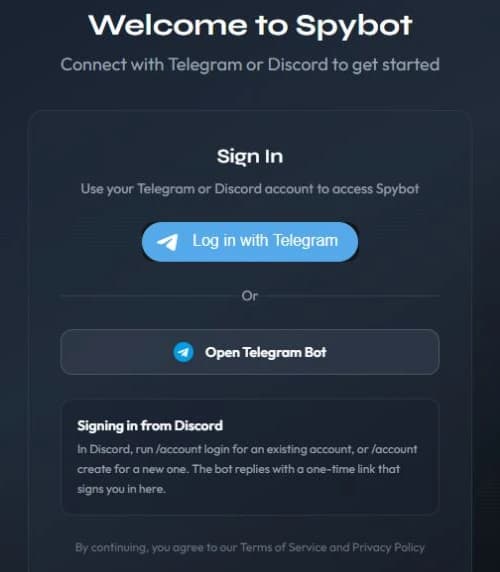
With Telegram
Three routes lead to the same account. Use whichever suits you:
- Log in with Telegram opens the Telegram login form. Confirm it, and the page signs you in.
- Open Telegram Bot (or Continue with @username) opens a chat with the bot and a login request. Approve it in Telegram, then come back to the page. The request stays valid for five minutes, and the page continues on its own once you approve.
- Send
/webto the bot. It answers with a 🌐 Open Web App button and a personal link, which signs you in when you open it.
If the browser blocks the Telegram window, allow pop-ups and start again. When the request expires, start a new one.
With Discord
In Discord, type /account login, or /account create if you are new. The bot replies with a private link. The link works once and expires after 90 seconds, so open it right away.
The page reads Signing in from Discord while it completes the link. A link already used, or older than 90 seconds, is refused: type /account login again and open the new one.
Sessions
The Web Terminal keeps you signed in in that browser, so a new visit opens your account directly. A Telegram session lasts seven days. When it ends, or when the session can no longer be checked, the page asks you to sign in again with the same account.
Signing out removes the session from that browser only: the account, the wallets and the settings stay as they are.
To sign out, open the profile menu in the top bar and press Log Out.
A login link opens your account
The Telegram link from /web and the Discord link from /account login both sign in without another confirmation. Never paste one in a chat, a ticket or a screenshot. If a link leaked, sign out of your browsers, then ask for a new one.
Next steps
- The live feed to follow your alerts.
- Trading and authorize a device before your first trade from a browser.
- Telegram and Discord to receive alerts on your phone.
Last verified on October 24, 2026
Community alerts for your server
Publish the moves of shared wallets in one channel of your Discord server, with filters, community trackers and delegated managers.
The live feed
Follow your alerts in the Web Terminal: tabs, Feed Settings, chains, search, history, the detail of one alert, and the sound.