
Quickstart: Telegram
Open SpyBot in Telegram, add your first wallet and receive its alerts in about a minute. Free, with no sign-up.
Open SpyBot
Open @wallet_tracker_solana_spybot in Telegram and press Start. SpyBot creates your free account on the spot and shows its main menu.
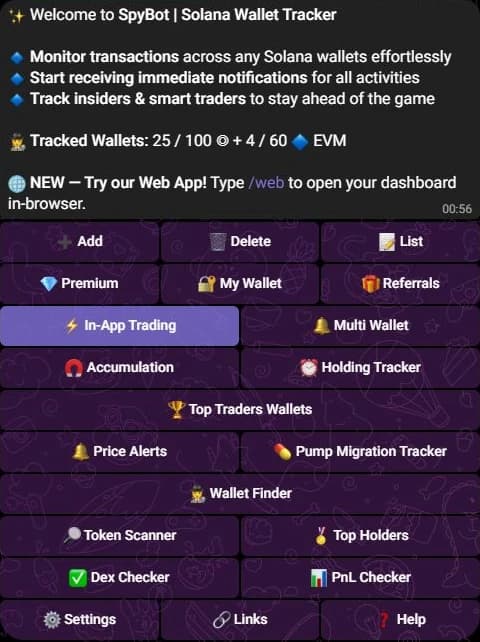
- 1Your counter: wallets tracked out of your plan's limit, for Solana (◎) and EVM (🔷).
- 2➕ Add opens the wallet form.
- 3⚙️ Settings holds every alert filter.
Add your first wallet
Press ➕ Add, or send /add. SpyBot asks for the addresses:
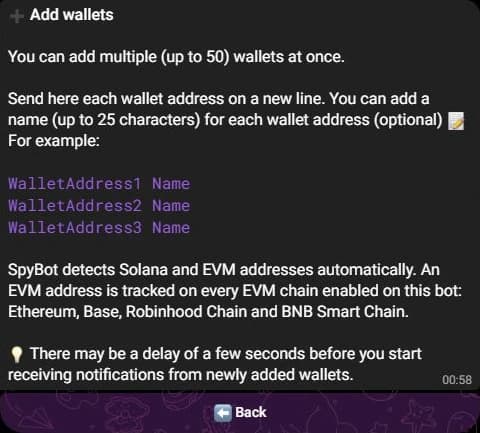
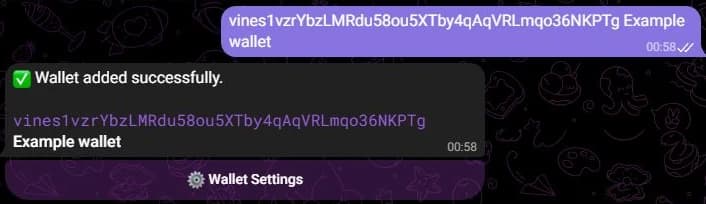
Paste a wallet address and send it. To name the wallet, add a space and the name after the address. SpyBot confirms:
Several wallets at once
Send up to 50 addresses in one message, one per line. Each line takes an optional name of up to 25 characters.
Receive your first alert
From now on, each move of that wallet arrives in this chat. A swap alert looks like this:

SpyBot
bot

🔴 SELL CARLO on PumpSwap
🔹MITCH swapped 22,835,335.56 CARLO ($0.0₄101) for 231.84 USDC
🔹MITCH:
CARLO: -22.84M ($231.84)
USDC: +231.68 ($231.68)
📊 Sold: 100% | PnL: ✅ +$120.67 (+108.55%)
💊 #CARLO (X|WEB) MC: $9.86K ⏰1w AXI | PH | GM
cRDDhdkeeqhaigByPw6FSuBgkcu7sbyYTGVobeWhHHY (x191)
⚡ Axiom:
https://axiom.trade/t/cRDDhdkeeqhaigByPw6FSuBgkcu7sbyYTGVobeWhHHY/@spybot
06:21
Under each Solana alert, BUY and SELL trade the same token from your SpyBot wallet in one tap.
Alerts from a newly added wallet can take a few seconds to start.
Next steps
- Add more wallets, on their own or 50 at a time.
- Choose which moves reach you in ⚙️ Settings.
- Open the Web Terminal: send
/webto the bot to get your personal login link.
Last verified on October 24, 2026
Welcome to SpyBot
SpyBot tracks wallets on Solana and five EVM chains, Polymarket included, and alerts you to every move on Telegram, Discord and the Web Terminal.
Quickstart: Discord
Add SpyBot to your Discord server, create your free account and receive wallet alerts in a private channel that only you can see.