
One account, three apps
One SpyBot account holds your wallets, filters, language, trading wallet and plan, and opens from Telegram, Discord or the Web Terminal.
A SpyBot account is one record. Telegram, Discord and the Web Terminal each show it, so a change saved in one app is already there in the other two.
One account, three apps
Telegram
Discord
Web Terminal
Your SpyBot account
- Tracked wallets
- Filters and settings
- Language
- SpyBot wallet for trading
- Plan and quotas
- Trackers and price alerts
What the three apps share
- Wallets. The same tracked wallets with their names, pause states and per-wallet filters. Add a wallet on Discord and it appears in the other two.
- Filters. The global filters, the per-chain switches and the per-wallet overrides. See Per-wallet settings.
- Language. The interface language you pick, and the language of the alert text when translation is on.
- Trading wallet. The SpyBot wallet that holds your SOL, places your trades and pays Premium.
- Plan and quotas. Wallet limits, alerts per hour and per day, and tool runs per day belong to the account. A tool run spent on Telegram is not available on Discord or in the Web Terminal.
Open the Web Terminal from Telegram
Ask the bot for a link
Send /web to the bot. It removes your command and replies with an 🌐 Open Web App button that signs you in.
Keep the link to yourself
The link identifies your account and stays valid for 7 days. Anyone who opens it is signed in as you, so do not forward it.
On the sign-in page you can also press Log in with Telegram and confirm in the bot.
Link Discord to your Telegram account
A new link is read-only. You grant more from the app you own, never from Discord.
Send /tg in Discord
SpyBot replies with a Telegram link and an Open Telegram button.
Confirm in Telegram
Open the link, press Start, check the Discord identity shown, then tap Confirm Discord link. Nothing about your account is shared before this confirmation.
A Discord account links to one SpyBot account, once.
Permission profiles
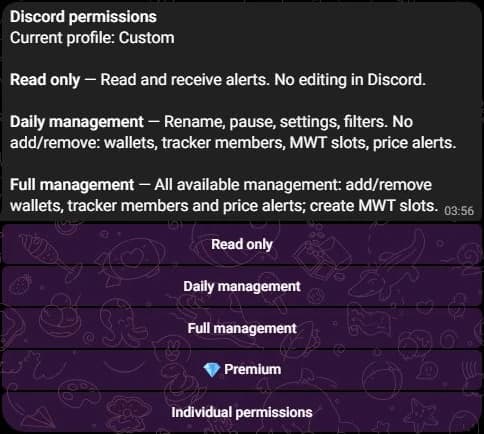
Open Telegram and send /discord, or use the Discord section of the Web Terminal settings, to choose what the link may do.
| Profile | What it adds |
|---|---|
| Read only | Read your tracked wallets, effective filters and Multi Wallet Tracker setups, and receive alerts. No editing from Discord. |
| Daily management | Rename, pause, settings and filters. No adding or removing wallets, tracker members, Multi Wallet Tracker slots or price alerts. |
| Full management | All management: add and remove wallets, tracker members and price alerts, and create Multi Wallet Tracker slots. |
Press Individual permissions to switch one permission at a time. A profile replaces the tracking permissions of the link: trading and server administration stay outside it, and the Premium payment permission is separate.
A Discord account without Telegram
Create the account in Discord
Type /account create. Your SpyBot account uses your Discord identity, with no Telegram and no email.
Open the Web Terminal
Type /account login. SpyBot replies with a private link that works once and expires after 90 seconds.
Wallets, filters, plan and quotas work the same. Your alerts arrive in your Discord channel, and the Web Terminal reads the same account.
Related
Last verified on October 24, 2026