
Per-wallet settings
Every tracked wallet uses your global filters. Override one value for one wallet, or restore the global settings, on Telegram, Discord or the Web Terminal.
Your global filters decide what reaches you for all your wallets. One wallet can depart from them: the value you set for that wallet is an override, it applies only to that wallet, and every app uses it.
Global and per-wallet settings
Global settings
Apply to every wallet that has no settings of its own.
Wallet A
Uses the global settings
Wallet B
Uses the global settings
Wallet C
Has its own settings, which replace the global ones for this wallet
Reset Wallet C to the global settings and it follows them again.
How inheritance works
- A filter with no per-wallet value follows your global setting, including when you change that global setting later.
- A filter with a per-wallet value ignores the global setting for that wallet only.
- The global master switches still come first. If Solana notifications, an EVM chain or the FOMO bridge switch is off for the account, no wallet gets those alerts.
- A wallet has 42 Solana filters, or 24 notification filters for each EVM chain it is tracked on.
- The Polymarket switches apply to the whole account. A Polygon wallet keeps its 24 Polygon filters but has no Polymarket switch of its own. See Polymarket traders.
Override one wallet
- Open 📝 List, then ⚙️ Settings under the wallet.
- Read the summary line: Filters: N custom (✏️) · M inherit global.
- Press a filter row to change it for this wallet. A row that differs from the global value carries ✏️.
- A row the account has switched off shows ⚫ (Global OFF) and stays locked until you enable it in the main ⚙️ Settings.
- Type
/wallet-filter listwith theaddressof a Solana wallet. Each key shows its value and its source. - Change one with
/wallet-filter set, giving theaddress, thekeyand thevalue. - For an EVM wallet, use
/evm-wallet-filterwith the same options and achain. - Editing needs the wallet filter permission of your Discord link.
- Open Wallets, then the settings icon of the wallet.
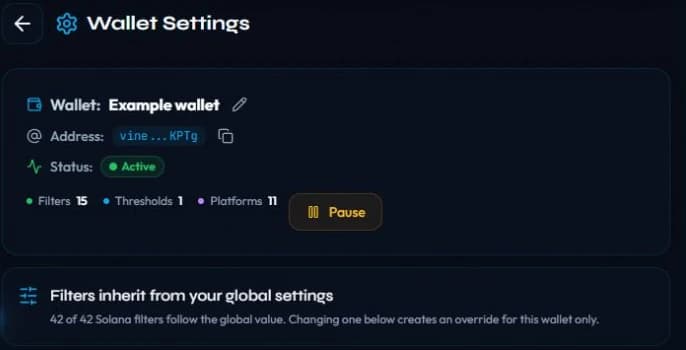
- The panel says Filters inherit from your global settings and counts the values that still follow them.
- Change a value to keep it for this wallet only. The wallet then shows Filters overridden for this wallet.
Return to the global settings
- Press ♻️ Use global filters (N) at the bottom of the wallet's ⚙️ Settings. The number is the count of overrides, and they are all cleared at once.
- Every other wallet keeps its own filters, and your global settings do not change.
/wallet-filter inheritwith theaddressand thekeyclears one override.- For an EVM wallet, use
/evm-wallet-filter inheritwith thechaintoo.
- Each row has Use global, or Return to the global value for a threshold.
- Use global filters clears every override of that wallet's Solana filters. Your global settings are not changed.
What a wallet setting does not change
- The wallet name and its pause state, which have their own controls. See Manage your wallets.
- The global filters of your other wallets.
- The global master switches of the account, which stay in charge.
Filter keys and defaults are listed in Filters and Advanced filters.
Related
Last verified on October 28, 2026
Polymarket traders
Follow a Polymarket trader from their profile for alerts on every trade, redemption, merge, split, conversion and reward on Telegram, Discord and the Web Terminal.
Why a wallet can't be added
Every reason SpyBot refuses a wallet, from a malformed address to a plan limit or a wallet that trades too fast, and what to do about each.