
Permissions for linked accounts
The three permission profiles a Telegram owner grants to a linked Discord account, what each one allows, and where to change them.
A Discord account linked with /tg can read your wallets, filters and trackers, and receives your alerts. To let it change anything as well, the owner of the SpyBot account grants a permission profile. You can grant one from Telegram or from the Web Terminal.
Who decides
Only the owner of the SpyBot account grants or revokes these permissions: through /discord in Telegram, or in the Web Terminal settings. A linked Discord account cannot widen its own access.
The three profiles
| Profile | What it allows | What it leaves out |
|---|---|---|
| Read only | Reading your wallets, settings and trackers, and receiving alerts in the linked channel. | Renaming, pausing, editing settings or filters, and creating or removing anything. |
| Daily management | Everything in Read only, plus renaming, pausing and resuming wallets, settings and filters, and Multi-Wallet Tracker link changes, on Solana, Ethereum, Base, Robinhood Chain, BNB Smart Chain and Polygon. | Adding or removing wallets, tracker members, MWT slots or price alerts. Payments, trading and server administration. |
| Full management | Everything in Daily management, plus adding and removing tracked wallets, tracker member wallets and tracker slots, and creating, editing or removing price alerts. | Trading, payments, subscription changes and server administration. |
Custom appears when the saved permissions match no profile. It happens after single permissions were switched on or off one by one.
Grant a profile from Telegram
Open /discord
In Telegram, send /discord. The screen shows your Current profile, then the three profiles with one line each, and a button per profile, plus 💎 Premium and Individual permissions.
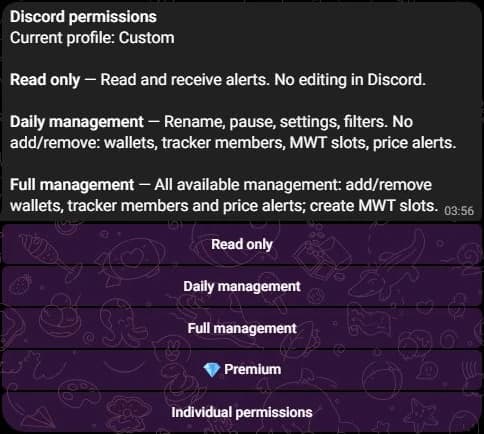
Read the review
Choosing a profile opens a review with its description and its scope: what it replaces, which chains it covers, and what it never touches. That scope line states that tracking permissions are replaced, that Multi-Wallet Tracker grants cover every supported chain, and that no trading or server administration is included.
Confirm
Press Apply profile. SpyBot answers Permissions updated. and the Discord account works with the new profile at once.
Grant a profile from the Web Terminal
Open Settings in the Web Terminal and find Discord permission presets. The block shows your current preset and how many of the 22 Discord permissions are enabled. Pick a preset to read Covers and Does not cover, then press the apply button, which names the preset, for example Apply Daily management.
Nothing is applied before you review and confirm. When the same account was changed somewhere else in the meantime, the block says so and offers Reload: reload, then choose the preset again.
Permission by permission
Individual permissions in /discord lists the 22 switches behind the profiles. Each covers one narrow action:
| Group | What the separate permissions cover |
|---|---|
| Wallets | Renaming a wallet, pausing and resuming its tracking, adding and removing tracked wallets. |
| Filters | Global Solana filters and the Polymarket switches, one Solana wallet, one EVM wallet, the chain filters of Ethereum, Base, Robinhood Chain, BNB Smart Chain and Polygon, the protocol groups, and the fields shown in an alert. |
| Multi-Wallet Tracker | Settings, on and off state, member wallets, links and chain-wide filters, and slot creation. |
| Accumulation alerts | Settings, and the on and off state with its triggered-token reset. |
| Holding Tracker | Settings, on and off state, and member wallets. |
| Price alerts | Pausing or resuming one alert, and creating, editing or deleting alerts. |
| Account | Pausing and resuming every alert of the account. |
A permission that was never granted shows as Read-only in the Discord screens and in the Web Terminal, with the command it would unlock.
Multi-Wallet Tracker chain scope
A Multi-Wallet Tracker permission covers the six supported chains. A grant recorded before the EVM chains existed covers Solana only: /discord then shows an extra row such as Enable EVM MWT settings editing, which extends that one permission to every chain. Pressing Keep the current scope leaves it as it is.
Revoke
- Choose Read only to return the Discord account to reading and receiving alerts.
- Use Individual permissions to switch off a single grant, for example wallet management only.
- Press Disconnect Discord to stop the access and the alerts of that account. Its Discord identity is then free.
No profile touches your funds
No profile, and no single permission, grants trading, payments, subscription changes or server administration. Trading from Discord stays available on the linked account, and never needs a permission.
Next steps
- Discord account or linked Telegram.
- Slash commands shows which command each permission unlocks.
- Security for the rest of the account safeguards.
Last verified on October 28, 2026