
Price alerts
Get a message when a Solana token crosses a market cap you set, once or on every crossing, for up to 30 days.
A price alert watches one Solana token and messages you when its market cap reaches the level you chose. Use it when you follow a token but do not want to watch its chart.
How it works
You set three things: the token, a market cap target, and whether the alert fires once or on every crossing. SpyBot reads the current market cap of the token when you create the alert, then compares it with your target.
- The target is a market cap, written like
100Kor1.5M. It must differ from the current market cap. - 1️⃣ One time sends one message, then stops.
- 🔁 Every crossing keeps alerting each time the market cap moves past the target in either direction.
- An alert expires 30 days after you create it. Create a new one to keep watching.
Once or every crossing
Once
Alerts the first time the market cap reaches your target, then stops.
Every crossing
Alerts each time the market cap crosses your target, up or down.
- Market cap
- Your target
- Alert sent
Price alerts cover Solana tokens only.
Alerts by plan
| Plan | Alerts you can keep |
|---|---|
| Free | 3 |
| Crab | 10 |
| Fish | 20 |
| Dolphin | 50 |
| Shark | 100 |
| Whale | 200 |
Paused alerts count until they expire or you delete them. When you reach the limit, delete an alert you no longer need or upgrade your plan.
Create, list and delete
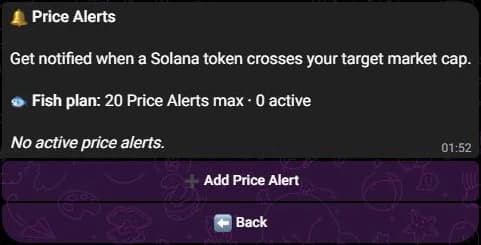
- Press 🔔 Price Alerts in the main menu.
- Press ➕ Add Price Alert, then send the token address.
- Send your target market cap, for example
250K. - Press 1️⃣ One time or 🔁 Every crossing.
The menu lists each alert with its target market cap, the current one, its state and its mode. Press ⏸ Pause, ▶️ Resume or 🗑 Delete under the alert.
- Create one with
/price-alert create mint:<token> target:250K mode:once, ormode:recurringfor every crossing. - List them with
/price-control list, five per page, then read one alert with/price-control view id:<id>. - Change the target or the mode with
/price-alert edit id:<id> target:500K. - Pause or resume one with
/price-control set id:<id> state:paused, and delete it with/price-alert delete id:<id>.
- Open Tools, then Price Alerts under Tracking.
- Paste the token mint or its Solscan link in Solana token address, then press Detect.
- Enter the Target market cap and choose One time or Every crossing under Notification mode.
- Press Create Price Alert.
Your Price Alerts lists each alert with its target, the current market cap, its mode, its state and its expiry date. Press Pause, Resume or Delete, then Confirm delete. You can also edit a target in place.
Several alerts can watch the same token with different targets.
Edge cases
- A token whose market cap cannot be read reliably is refused, so the alert is never created on a wrong target.
- Pausing applies to the next scan. An alert already prepared can still arrive after you pause it.
- An expired alert leaves the list. Nothing is charged to recreate it.
Related
- Quotas and delivery limits to see what counts towards your plan.
- Filters to narrow your wallet alerts.
- Plans for the limits of each plan.
Last verified on October 24, 2026