
Your SpyBot wallet
Open your SpyBot wallet on Telegram, Discord or the Web Terminal, deposit SOL on Solana, read your balance and export the private key.
Your SpyBot wallet is the address your trades spend from and the address that pays for your plan. It is the same wallet on Telegram, Discord and the Web Terminal, so you fund it once.
Open your wallet
- Send
/wallet, or open ⚡ In-App Trading and press 🔐 My Wallet. - The screen shows Public Key: the address to copy, and SOL Balance: its current balance.
- Press 🔄 Refresh to read the balance again. The button accepts one press every 5 seconds.
- Open your menu with
/startand press 🔐 My Wallet. With no wallet yet, the Trade screen also offers Wallet. - The screen shows your address, its SOL balance and the deposit reminder.
- Press Refresh to read it again.
A Discord-native account without a wallet sees Create wallet instead.
- Open Trading in the Web Terminal. The top card holds your address, a copy button and Balance in SOL, with its value in dollars.
- The same address and balance appear under Premium, in In-App Wallet.
A Discord-native account without a wallet creates it there with Create payment wallet.
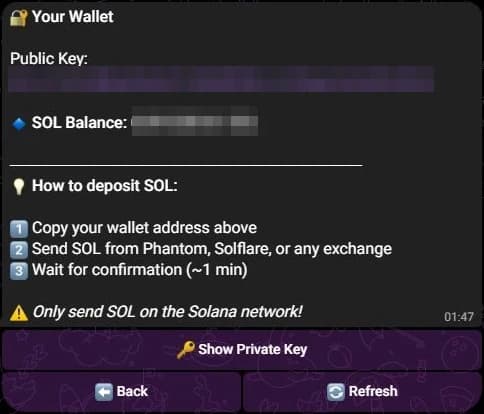
The address and the balance are blurred in this example.
Deposit SOL
- Copy the address from the wallet screen.
- Send SOL to it from a wallet such as Phantom or Solflare, or from an exchange.
- Wait for the transfer to confirm, usually under a minute, then refresh the balance.
Send SOL on the Solana network only. A transfer on another chain, or a token sent to this address by mistake, does not credit your balance.
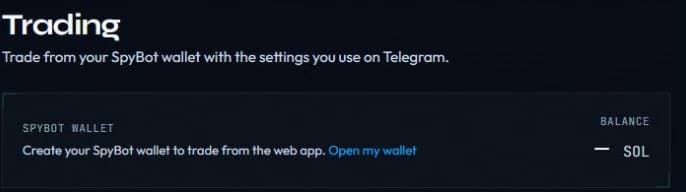
An account without a SpyBot wallet sees this card. Once the wallet exists, it shows the address and the balance.
Read your balance
The wallet screen shows the SOL balance. The Web Terminal also lists every token the wallet holds, under Holdings, with its dollar value when a price is known.
A trade needs SOL for the amount, the 1% fee and about 0.01 SOL of network costs. If the balance is below that, the order is refused and the app tells you how much SOL the order needs.
Withdrawals
No app has a send or withdraw button. The SpyBot wallet exists to trade and to pay for your plan; it cannot send SOL to another address from the interface.
To move funds out, export the private key and import it into a Solana wallet you control, then send from there. Do this only on a device you trust, and move the remaining funds to a fresh wallet afterwards.
The private key is the wallet
Anyone who reads the key controls every SOL and token in that wallet, for good. SpyBot never asks for it in a chat, and support never needs it.
Export the private key
- Open 🔐 My Wallet.
- Press 🔑 Show Private Key.
- SpyBot answers with 🔑 Your Private Key and the key in a copyable block. Press ⬅️ Back to return to the wallet.
Every Telegram account can export its key this way.
- Open 🔐 My Wallet.
- Press Show private key, read the warning, then press Reveal my private key.
- The key appears in a message only you can see. Discord replaces that message 60 seconds later.
Export works for a Discord-native wallet. A wallet linked from Telegram shows a different message: open 🔐 My Wallet and 🔑 Show Private Key in Telegram instead.
- Open Premium and the In-App Wallet card.
- Press Reveal private key and read the warning.
Export works for a Discord-native wallet. An account linked to Telegram is told to export from the Telegram bot.
Before you copy the key
A revealed key stays visible in Telegram and in your browser history. Reveal it in private, copy it, then delete the message or close the tab. Never paste it into a site, a bot or a support chat that asks for it.
Related
Last verified on October 24, 2026