
Security best practices
How to keep your SpyBot wallet safe, spot fake bots, and know what SpyBot staff never ask for.
Tracking a wallet takes its public address and nothing else. No connection, no signature and no key. The only key you hold is the private key of your own in-app wallet, and it belongs to you alone.
Your in-app wallet
The in-app wallet holds the SOL you trade with and the SOL you pay for plans. It has a public address you can share and a private key you never share.
- Telegram: 🔐 My Wallet shows the public key and the balance. 🔑 Show Private Key reveals the key.
- Discord and the Web Terminal: show the key for Discord-native accounts only. A Telegram account exports its key from Telegram.
- Anyone who has the private key controls every SOL left in that wallet. A second person with the key needs no approval from you.
The key stays with you
Import the key only into a wallet you control, and keep the trading balance there at a level you can lose. SpyBot never needs the key to send alerts, to trade from the bot, or to renew a plan.
Fake bots and impersonators
Only the links on this page are SpyBot. A lookalike username, a copied avatar or a channel with the same name proves nothing.
- SpyBot writes in the Telegram chat you opened, in the Discord channel you set for alerts, and in the Web Terminal you signed in to. A message from another account is not SpyBot.
- A bot or a person who asks for your private key, your seed phrase or your password is not SpyBot.
- A "wallet validation", a "sync", a "migration" or a small SOL transfer to unlock an account is a scam.
- A giveaway, an airdrop that needs your key, or a support agent who writes to you first is a scam.
Official links
These are the only SpyBot addresses:
- Telegram bot: @wallet_tracker_solana_spybot
- Web Terminal: app.spybot-tracker.com
- Add SpyBot to Discord: Add to Discord
- News channel: @spybot_news_wallet_tracker
- X: @SpyBot_tracker
- YouTube: @SpyBot_Tracker
- Support: @InjustZz
Check the full username, character by character, before you press anything. A domain that is not spybot-tracker.com is not SpyBot, even when the page looks identical.
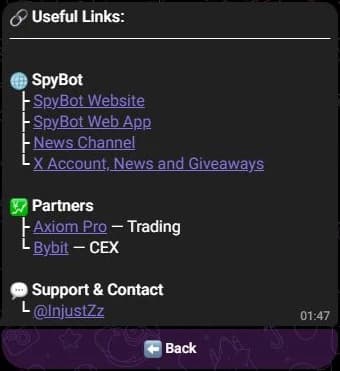
The bot's 🔗 Links menu lists the same official addresses.
What SpyBot staff never ask for
SpyBot and its team never ask for:
- your private key, your seed phrase or your password;
- a payment key, a card number or a code from your phone;
- a wallet connection approval to "verify" your account;
- a SOL transfer to unlock, restore or upgrade a plan;
- remote access to your device or a screen share.
The Discord /support command prints the same warning: Never share a password, a seed phrase, a private key or payment keys.
Login links
- A Discord login link from
/account loginworks once and expires after 90 seconds. A forwarded link cannot be reused. - The Web Terminal signs you in on the site itself. Never type your Telegram login code into a page that asked you to open a link from a chat.
Related
Last verified on October 24, 2026