
Commands and main menu
The 11 SpyBot commands on Telegram, every button of the main menu with where it leads, and the language switches.
SpyBot answers 11 commands in your private chat with the bot. Everything else runs from the buttons of the main menu, which /start opens again whenever you need it.
In a group or a channel the bot ignores every message except /channel.
Commands
| Command | What it does |
|---|---|
/start | Creates your account if you are new, then opens the main menu. |
/add | Asks for the addresses to track. /add <address> adds that wallet right away. |
/delete | Opens the delete menu. /delete <address> removes that wallet right away. |
/list | Lists your tracked wallets, 10 per page, each with its settings button. |
/wallet | Opens 🔐 My Wallet: your public key, your SOL balance, a button for the private key and 🔄 Refresh. |
/trade | Asks for a token address. /trade <token address> opens the buy screen of that token. |
/upgrade | Sends the pricing image, then opens the Premium menu. |
/mwt | Opens the Multi-Wallet Tracker menu. |
/web | Sends a personal login link to the Web Terminal. |
/bots | Lists the SpyBot bots your plan unlocks, with their user count, and links to switch to one. |
/channel | Links a group or channel so your alerts are forwarded there. /channel off unlinks it. |
/channel is the only command that works outside your private chat: send it inside the group or channel you want to link, with SpyBot added as an administrator.
My Wallet holds the private key of your SpyBot wallet. Anyone who has that key controls the funds, so keep it out of screenshots, chats and cloud notes.
The main menu
The menu opens with a short welcome and your wallet counter: wallets tracked out of your plan limit for Solana (◎), then the same for EVM addresses (🔷) once you track one. When every alert is paused, a line above the counter says so.
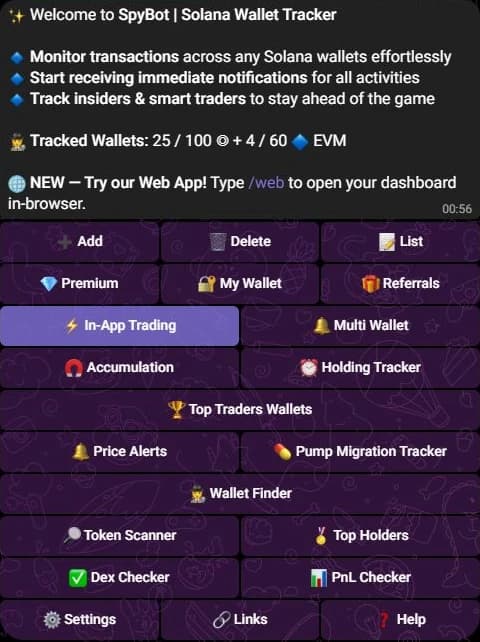
| Buttons, left to right | Where they lead |
|---|---|
| ➕ Add · 🗑️ Delete · 📝 List | The add form, the delete menu, the wallet list. |
| 💎 Premium · 🔐 My Wallet · 🎁 Referrals | Plans and payment, your trading wallet, your referral link and rewards. |
| ⚡ In-App Trading · 🔔 Multi Wallet | The trading screen, the Multi-Wallet Tracker. |
| 🧲 Accumulation · ⏰ Holding Tracker | Accumulation alerts, the Holding Tracker. |
| 🏆 Top Traders Wallets | The Top Traders categories. |
| 🔔 Price Alerts · 💊 Pump Migration Tracker | Price alerts on Solana tokens, the Pump.fun Migration Tracker. |
| 🕵️ Wallet Finder | The Wallet Finder tool. |
| 🔎 Token Scanner · 🏅 Top Holders | The Token Scanner, the Top Holders tool. |
| ✅ Dex Checker · 📊 PnL Checker | The Dex Checker, the PnL Checker. |
| ⚙️ Settings · 🔗 Links · ❓ Help | Your alert filters and the language switches, links to the site and partners, and the screen that explains the icons of an alert. |
🔔 Price Alerts and 🔔 Multi Wallet share the same bell. Read the label, not the icon.
Every button edits the menu message instead of sending a new one, so you always come back to the same screen. ⬅️ Back returns to the menu from any screen, and a message the bot does not recognize answers with the menu as well.
Language
⚙️ Settings leads to 🌍 Language Settings, which holds your two switches and the five languages: English, Français, Español, Русский and 中文.
- 📱 Menu Translation translates the menus, the buttons and the screens.
- 🔔 Notification Translation translates the text of your alerts, so an alert reads in the language you chose.
Both switches are on by default. Turning one off keeps that part in English. Token names, amounts, wallet addresses and links are never translated, so an alert stays readable next to any translation.
Next steps
- Quickstart: Telegram to add your first wallet.
- Add wallets on their own or up to 50 at a time.
- Types of alerts to know what each alert reports.
Last verified on October 24, 2026
EVM tokens: quick-buy links
Turn on the GMGN link and the quick-buy buttons of each EVM trading bot, chain by chain, on Telegram, Discord and the Web Terminal.
Send alerts to a group or channel
Forward your SpyBot alerts to one Telegram group or channel: the rights the bot needs, the test message, /channel off and limits.