
Dedicated bots
Move your SpyBot account to another SpyBot bot with /bots: which bots your plan unlocks, what follows you and what stays behind.
SpyBot runs on several Telegram bots. /bots lists the bots your plan unlocks with the number of accounts each one serves, and moves your account to the one you pick. A bot with fewer accounts carries less traffic.
What the screen shows
Send /bots in your private chat. The screen opens with Pick a bot from the list below to switch to it., then:
| Line | What it is |
|---|---|
| Spybot Main Bot | The bot every account can use, with its number of accounts out of its 10,000 places. |
| The premium lines | One line per bot your subscription unlocks: its name, linked, and its number of accounts out of its capacity. |
| The closing line | A reminder that the bots above carry fewer accounts. |
Only the bots your plan reaches are listed, so the list grows when you upgrade. Each bot name is the link to it. The only button on the screen is Main Menu.
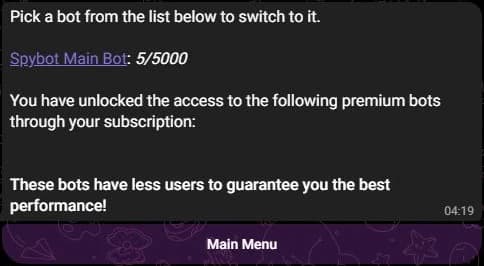
Here no premium bot is unlocked yet. The bots your plan opens are listed under the second line.
Switch to another bot
- Send
/bots, then press the name of the bot you want. - Telegram opens a chat with that bot. Press Start: the link carries a code that tells the bot to move your account.
- The main menu of that bot opens, and your alerts continue from there.
What follows you
Your account is one record, found from your Telegram account, so the bot you move to reads the same data:
- your tracked wallets, with their names, their chains and their own settings;
- your filters, your trackers and your price alerts;
- your plan, its limits and your alert quota;
- your SpyBot wallet and the funds in it.
A move changes one thing: which bot sends your messages. SpyBot stores that choice on your account.
What stays behind
- The conversation with the previous bot: its messages, its pinned menu and any form you had started but not sent. You find it again by pressing its name in
/bots. - The account counts on that screen, which move as other accounts join.
- A group linked with
/channel. The copy comes from the bot that delivers your alerts, so add the new bot to the group as an administrator. See Send alerts to a group or channel.
One bot answers you at a time. Write to another one and it answers You are currently assigned to the following bot, with a link to the bot that serves you.
When your plan changes
Each bot has a minimum plan. When yours no longer reaches the bot you chose, that bot tells you to upgrade to the plan it needs and puts your account back on the main bot. Your wallets, filters and trackers are kept.
Related
- Commands and main menu for
/botsnext to the other 10 commands. - Plans and limits for the plan each bot requires.
- Send alerts to a group or channel after a move.
Last verified on October 24, 2026
Send alerts to a group or channel
Forward your SpyBot alerts to one Telegram group or channel: the rights the bot needs, the test message, /channel off and limits.
Add SpyBot to your server
Install SpyBot on a Discord server you own, check the five permissions it asks for, and read the welcome message it posts.