
Language
Switch SpyBot between English, French, Spanish, Russian and Chinese on Telegram, Discord and the Web Terminal, and choose what gets translated.
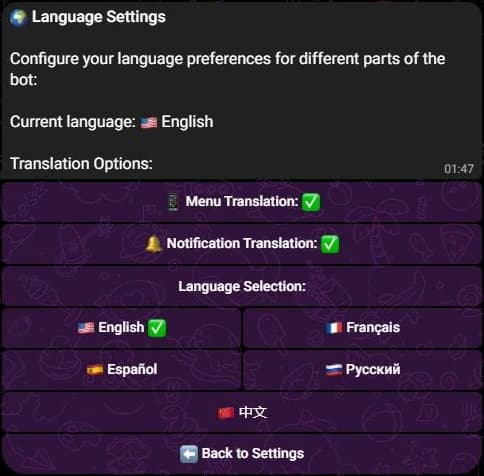
SpyBot speaks five languages: English, Français, Español, Русский and 中文. The choice belongs to your account, so Telegram, Discord and the Web Terminal read the same value. Two switches then decide which parts are translated.
The two switches
| Switch | Covers | Default |
|---|---|---|
| Menu Translation, Translate Menus on the Web Terminal | Menus, command replies and screens. | On |
| Notification Translation, Translate Notifications on the Web Terminal | The text inside your alerts. | On |
Both start on. With one of them off, that part stays in English while the rest keeps your language. Some readers keep the menus in English for the commands and want their alerts in their own language.
Where to change it
- Press ⚙️ Settings.
- Press 🌍 Language Settings. The row sits on the Solana settings screen, and the EVM screens do not repeat it, so move back to Solana to find it.
- Press a language to apply it at once, or press 📱 Menu Translation and 🔔 Notification Translation to flip a switch.
- Press ⬅️ Back to Settings.
- Type
/language viewto read the current language and both switches. - Type
/language set, then pick a language or one of themenusandnotificationsoptions. Both taketrueorfalse. - The reply repeats the saved values. A Discord account needs its SpyBot link first, see Discord accounts.
- Open the Web Terminal at https://app.spybot-tracker.com.
- Add
/settings/languageto the address. No menu or button leads to this page. - Press a language, then Translate Menus or Translate Notifications.
- Press the back arrow to return to the settings page.
What the language covers
With both switches on, the Telegram menus, the Discord replies and the Web Terminal screens follow your choice, and so does the text inside an alert: the action words such as BUY or SELL, and the labels around the amounts.
Alerts on Solana and on the EVM chains exist in the five languages. On Telegram, the wording of EVM and Polymarket alerts follows the language you choose while Notification Translation is on. Discord and the Web Terminal write them in the five languages too.
Limits worth knowing
- The preference is one per account. Changing it on one app changes all three.
- A language never changes what you track, your filters, your trackers or your trading.
- Token symbols and protocol names stay as they are written on chain.
Related
- Discord commands for
/languageamong the others. - Telegram commands.
- Display options: which alert lines you see, whatever the language.
- Web Terminal sign-in.
Last verified on October 28, 2026
Display options
Choose the lines an alert carries, from the summary and the position block to the token address, the image, and the gas and market data of an EVM chain.
Multi-Wallet Tracker
Get one alert when several of your tracked wallets buy the same token inside a time window, on Solana or on an EVM chain.