
Pump.fun Migration Tracker
Get an alert when a Pump.fun token graduates to the AMM, filtered by the keywords you set. Telegram and the Web Terminal.
The Pump.fun Migration Tracker alerts you when a Pump.fun token leaves its bonding curve for the Pump.fun AMM. Use it to see graduations as they happen, without tracking the wallets behind them.
What it watches
Switching the tracker on adds one wallet to your list: SpyBot's Pump.fun migration address, named 💊 Migration. SpyBot watches that address like any other wallet, and every alert it produces is a graduation.
- It uses one of your Solana wallet places. If your Solana list is full, SpyBot refuses the switch and the tracker stays off.
- The 💊 Migration wallet appears in 📝 List with your other wallets. Pausing it stops the graduation alerts and leaves your other wallets alone.
- Switching the tracker off removes the wallet and frees the place.
Keywords
The tracker keeps its own list of keywords: up to 20 words, 20 characters each.
- The match ignores case and looks inside the token name and its symbol.
pepematches PEPE, PEPE2 and Pepe Classic. - With no keyword, every graduation reaches you.
- With keywords, a token that matches none of them is dropped.
What the alert shows
🚀 TOKEN GRADUATED on PumpFun
🔹TOKEN NAME migrated to Pump.fun AMM!
👤 Dev: 4AbC…9xYz | Migrations: 2 | Mints: 5
👥 Holders: 914 | 5m: +1.4% | 1h: -3.2%
💊 #TOKEN MC: $69K AXI | PH | GM
<token address> (x342)- The first line links the transaction on Solscan.
- The second line names the token and says it moved to the AMM.
- The developer line gives the developer address and how many tokens it has migrated and minted.
- The holders line gives the holder count with its change over 5 minutes and 1 hour.
- The last line gives the market cap, the age of the token and the AXI, PH and GM links, then the token address with how many trades SpyBot has recorded for that token.
The 📝 Description, 🔗 Links and 📋 Token Address switches of ⚙️ Customize Notifications decide which of these lines appear.
Which filters apply
A graduation is not a trade. The buy, sell and swap switches, the minimum and maximum amount and the market cap bounds do not hide one. These do apply:
- the 🟢 Solana notifications switch of ⚙️ Settings, and the account-wide pause;
- the paused state of the 💊 Migration wallet;
- your keyword list;
- your hourly and daily alert quota.
Turn it on
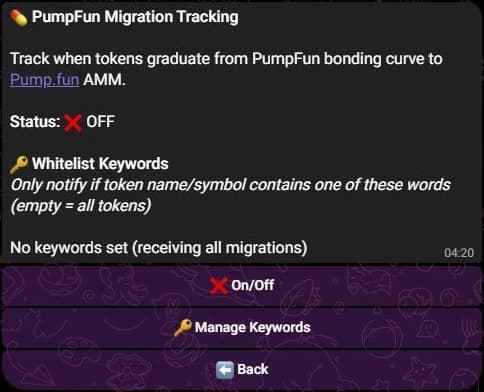
- Press 💊 Pump Migration Tracker in the main menu.
- Press ❌ On/Off to switch the tracker on. The status line then reads ON.
- Press 🔑 Manage Keywords, then ➕ Add Keyword, and send the words separated by commas or new lines.
- Press ⬅️ Back twice to return to the main menu.
The screen lists your keywords under 🔑 Whitelist Keywords, five per line. The keywords screen shows the count out of 20, one ❌ button per word to delete it, and 🗑️ Clear All.
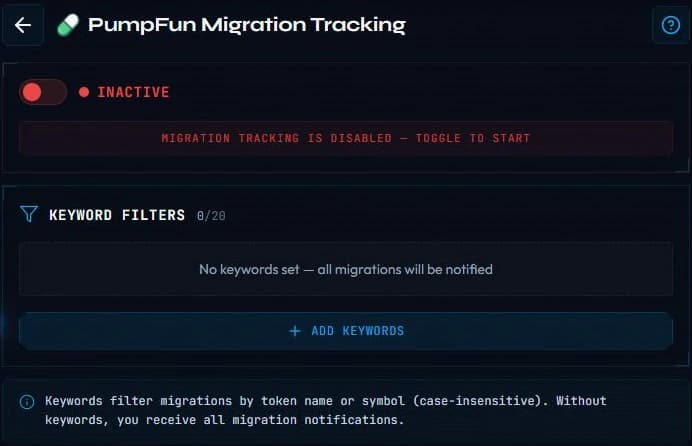
- Open Tools, then PumpFun Migration under Tracking.
- Switch the toggle on. The page shows Active.
- Press Add Keywords, type the words separated by commas or new lines, then confirm.
- Remove one word with its cross, or every word with Clear All.
Availability
Telegram and the Web Terminal only. Discord has no screen and no command for this tracker, so it cannot be switched on there.
The tracker is not one of the six research tools, so it takes no place in the daily tool allowance.
Related
- Price alerts when a market cap level matters more than a graduation.
- Alert types for everything else SpyBot reports.
- Plans for the wallets each plan allows.
Last verified on October 24, 2026