
Pause alerts
Stop every alert with one switch, pause a single chain, or pause Discord delivery, and know what happens to the alerts already queued.
Pause when you close the app for the night or when one wallet floods the feed. A pause stops new alerts and leaves everything else as it is: your wallets, your filters, your trackers and your plan.
Pause everything
- Press ⚙️ Settings.
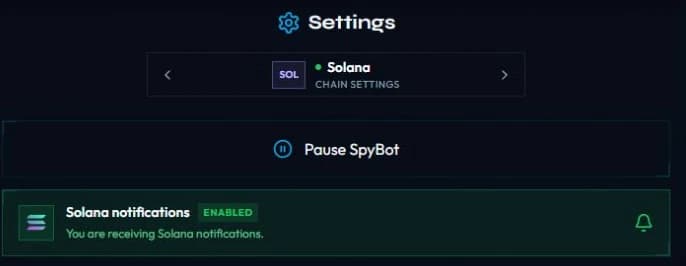
- Press ⏸️ Pause SpyBot. The button becomes ▶️ Unpause SpyBot while you are paused.
- Open ⚙️ Settings.
- Press ⏸ Pause everything, then Confirm.
- Resume with ▶️ Resume everything.
- Open Settings.
- Press Pause SpyBot. Press Unpause SpyBot to resume.
What SpyBot confirms
"⏸️ Paused. All chains and trackers are paused; individual wallet and tracker settings are preserved. Alerts already queued may still arrive."
What a pause covers
- Every chain, on all three apps.
- Every tracker: Multi-Wallet Tracker, Accumulation alerts, Holding Tracker and Price alerts.
- Nothing is rewritten. A wallet you paused by hand stays paused, a tracker you switched off stays off, and your subscriptions do not move.
Resuming brings back exactly what you had: "▶️ Resumed. Alerts are delivered again; individual wallet and tracker settings are unchanged. Alerts already queued may still arrive."
Alerts already queued
A few alerts can still land
A transaction decoded moments before your pause can already be in the delivery queue, so an alert may arrive right after you pause. The confirmation says so. On Discord a queued alert expires after 10 minutes, see Quotas and delivery limits.
While you are paused, new events stop at the account filter, so the Web Terminal feed stops adding rows. The alerts you already read stay in the feed.
Pause one chain
You can silence one chain and keep the others running.
- On Telegram, the chain button reads 🟢 Solana notifications — ON. Press it to switch that chain to PAUSED.
- On Discord, the same switch sits on the screen of each chain, under its tab.
- On the Web Terminal, press Pause Solana notifications at the top of the chain settings.
A paused chain keeps its filters and its wallets, and the screen states it: "This chain is paused. Its detailed filters are saved and remain configurable."
Pause Discord delivery only
📬 Discord alerts has its own Pause delivery button. It stops the Discord channel and leaves Telegram and the Web Terminal alone. SpyBot asks you to confirm: "Pause your Discord alerts? Your tracked wallets stay saved."
The pauses, side by side
| Pause | Where | What it stops |
|---|---|---|
| Global pause | ⏸️ Pause SpyBot on each app | Every alert, on every chain, on all three apps |
| Chain pause | The chain switch of the chain settings | That chain only |
| Delivery pause | Pause delivery under 📬 Discord alerts | The Discord channel only |
| Quota pause | Automatic, when a counter is full | Every wallet, until the counter resets |
A quota pause marks the wallets ⌛ Quota paused in your list and lifts on its own. See Quotas and delivery limits.
Related
Last verified on October 24, 2026
Buy buttons and trading-bot links
Trade a Solana token from the alert, or open it in Axiom, BullX, Photon, GMGN, Terminal, Bloom and the other bots SpyBot supports.
Quotas and delivery limits
Hourly and daily alert quotas by plan, the Quota paused status, when the counters reset, and the 10-minute delivery window on Discord.