
Dex Checker
See whether a token paid DexScreener, the status of that order, and the boosts those orders bought.
The Dex Checker reads the order record DexScreener keeps for one Solana token. Use it to tell a token that paid for its profile from one that did not, and to read the status of that order and the boosts it bought.
What it answers
- Whether DexScreener holds a paid order for the token at all.
- The status DexScreener reports for that order right now: approved, processing, on hold, cancelled or rejected.
- The type of the order: token profile, community takeover, token ad or trending bar ad.
- When the payment was made.
- The boost amount those orders bought, and how many boost orders it counts.
Run it
- Press ✅ Dex Checker in the main menu.
- Send the token address, or any link that contains it.
- The report answers under your message, with your trading buttons below it.
Token: <mint>
Dex paid: ✅
Status: approved
Payment: 3 days ago
🚀 Paid boosts: 2500
The status line appears only when an order record exists, the payment line only when a payment time is stated, and the boosts line only when the amount is above zero.
- Type
/analyze dexand fill thetokenoption with the mint. - Or open 🧰 Tools, press 🪙 DEX, then 🚀 Enter token & run, paste the mint and press 🚀 Check.
- The embed opens on a verdict, then 🧾 Order, 📌 Status, 🕒 Paid and ⚡ Boosts. Its colour follows the verdict.
A Discord account answers only once it is linked to a SpyBot account: /tg links a Telegram account, and /account create makes a Discord-native one.
- Open Tools, then Dex Checker under Insights.
- Paste the token address, or a link that contains it.
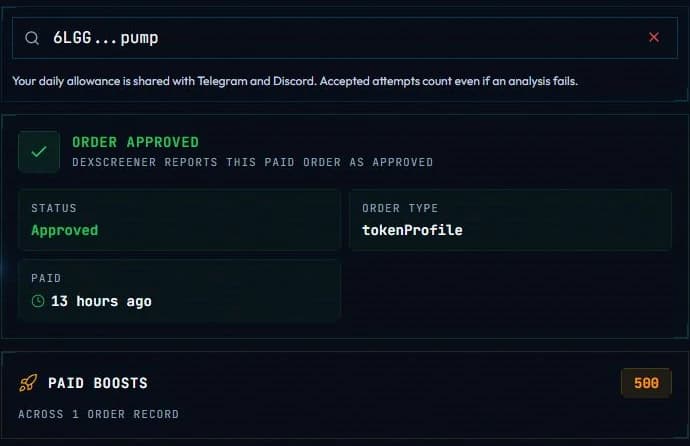
- The page opens on the verdict, such as Order approved, then shows Status, Order type and Paid, and a Paid Boosts card when the orders bought some.
The three verdicts
| Mark | Meaning |
|---|---|
| ✅ | DexScreener reports the paid order as approved. |
| ⚠️ | A paid order exists, but the status DexScreener reports is not approved, for example cancelled or rejected. |
| ❌ | DexScreener holds no order record for this token. |
Discord also has a fourth answer, — DEX payment status unavailable, and the Web Terminal shows Order status unavailable when the record could not be read. Neither is a verdict on the token.
What it does not say
An approved order is a payment DexScreener accepted and reports as approved. It is not a listing, a verification or an audit of the token. Read the status beside the mark before you draw a conclusion.
The boosts here are the amounts bought through the paid orders. That total is not the active-boost count of the pair, which the Token Scanner shows on its header line.
Daily allowance
The Dex Checker keeps its own counter: 2 runs a day on Free, 5 on Crab, 10 on Fish, 25 on Dolphin, then unlimited on Shark and Whale. Telegram, Discord and the Web Terminal spend the same runs.
Limits and edge cases
- Solana tokens only.
- An accepted run uses its place in the allowance even when the reading fails, and SpyBot waits 15 seconds between two analyses on one account.
- A token can carry several orders. SpyBot reads the order record its provider exposes and sums the boost amounts the provider returns.
- An order status changes over time, so the same token can read approved today and cancelled next week. Run the check again to read the current status.
- When no order record is found, the answer is a real no order, not a failure.
Related
- Token Scanner for the whole report of the token.
- Tools and daily allowance for the other research tools.
- Alert anatomy for the links an alert shows on a token.
Last verified on October 24, 2026