
Community alerts for your server
Publish the moves of shared wallets in one channel of your Discord server, with filters, community trackers and delegated managers.
Community alerts send the moves of a set of wallets into one channel of your Discord server. Every member who can read that channel sees each buy, sell and transfer, and the alerts of the server's own trackers. Your personal alerts stay in your own channel.
The workspace belongs to the server, not to the member who created it. An owner holds it, managers help run it, and one plan covers the whole server.
Set it up
Create the workspace
Run /community setup inside the server, with the channel_id of the channel that will receive the alerts. SpyBot checks that it can post there before it creates anything.
You need to be the server owner with Manage Server, and this Discord account must be linked to a SpyBot account.
The workspace starts paused, and nothing is published before you enable it.
Buy a plan for the server
Plans are bought from the Web Terminal, under Communities, in SOL from your SpyBot wallet. Discord community plans lists the three plans and what each one covers.
Adding a wallet needs an active plan. Without one, /community wallet-add answers This workspace has no active entitlement for tracking yet.
Add the shared wallets
Run /community wallet-add with the address and chain: set to solana, ethereum, base, robinhood, bsc or polygon. The optional name becomes the label shown in the alerts.
/community import copies a wallet that is already on your personal list, with its label. The copy is independent: renaming or removing the personal wallet does not touch it.
The number of wallets is capped by the plan.
Set the filters
Run /community filters. types takes BUY, SELL and TRANSFER, separated by commas. min_usd hides smaller moves, and 0 keeps every amount. language is the language of the alerts: en, fr, es, ru or zh.
An option you leave out keeps its current value, so /community filters min_usd:100 changes the amount alone.
Test the channel
Run /community test. SpyBot posts a synthetic message in the channel that says what the channel will receive. Sending a test pauses delivery.
A channel that changed since its last test needs a new one.
Enable the alerts
Run /community enable with confirm:true. SpyBot checks the channel, the plan and the wallet count, then starts publishing.
/community status shows the role, the delivery state, the plan limits, the channel, the filters, the wallets and the managers at any time.
The same screens sit in the panel: press 👥 Community in the SpyBot menu inside the server.
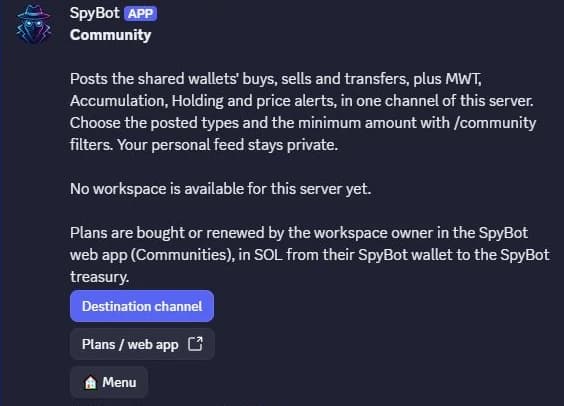
Before the workspace exists. Once it does, the panel adds Shared wallets, Trackers, Managers and Test channel.
What members see
Alerts appear in the chosen channel, on the same card SpyBot uses for a personal Discord alert: the token, the wallet and its label, the amount, the market cap, the token details and the usual links. A tracker alert also names the server and the tracker at the bottom.
Members read the channel and nothing else. /community and /community-tracker answer privately, and a member without the owner or a manager role gets a refusal when they open the panel.
Managers
The owner delegates with /community manager-add and discord_id:. The person needs Manage Server in the server and a linked SpyBot account, and a workspace holds up to 10 managers.
Managers run the wallets, the filters and the trackers. The destination channel, the test and the switch that enables delivery stay with the owner.
SpyBot reads the Discord permissions again on every command, so a manager who loses Manage Server loses access on the next one.
Transfer and recovery
/community transfer proposes the workspace to another owner, who has 15 minutes to accept it with /community accept-transfer. Accepting pauses delivery and clears the managers.
When the server changes hands, its new owner takes the workspace back with /community recover and confirm:true. Recovery pauses delivery, removes the managers and cancels a pending transfer.
Community trackers
/community-tracker adds alerts built on the community wallets, not on your personal list.
| Kind | Chains | Settings |
|---|---|---|
| Multi-Wallet Tracker | Five chains | min_wallets 2 to 100, window_minutes 1 to 10,080, min_usd |
| Accumulation | Solana | min_wallets, min_buys 1 to 1,000, min_percent 0 to 100, window_minutes, min_usd, mode |
| Holding | Solana | holding_minutes 1 to 360, min_percent 1 to 100 |
| Price alert | Solana | token, target_market_cap, direction above or below, mode |
A tracker holds up to 100 addresses, all taken from the community list, and only wallets of its own chain count. /community-tracker create stores it paused; /community-tracker state with enabled:true and confirm:true publishes it. Editing a live tracker keeps it live, so the edit needs the same confirmation.
One workspace can run up to 5 Multi-Wallet Tracker trackers per chain, 10 price alerts, one accumulation tracker and one holding tracker.
Delivery rules
- An alert still waiting after 10 minutes expires without being sent, and delivery records are kept for 7 days.
- The plan counts an alert when it is accepted, even if that alert expires before delivery.
- The hourly and daily counters belong to the workspace, and stay separate from your personal limits.
- Delivery stops while the workspace is paused, while the plan is not active, when the owner loses Manage Server, or when SpyBot can no longer post in the channel.
Related
- Discord community plans
- Communities page
- Multi-Wallet Tracker and Price alerts for the same alerts on your own wallets
Last verified on October 28, 2026