
Token Scanner
Read one Solana token in a single report: market cap, liquidity, holders, creator, ATH, volume and its DexScreener order.
The Token Scanner reads one Solana token and returns everything SpyBot knows about it in one report: market numbers, activity, holders, creator history and the DexScreener order. Use it before you buy a token you found a minute ago, or to see what a creator did before this mint.
What it answers
| Question | In the report |
|---|---|
| How big is it? | Market cap, price, liquidity and the age of the pair. |
| How high did it go? | ATH price, ATH market cap and the distance from that high. |
| Is it trading? | Volume and buys against sells over 5 minutes, 1 hour and 24 hours. |
| Who holds it? | Holder count and the share held by the top 10. |
| Who made it? | Creator address, what it still holds, its migrations and its mints. |
| Is it pushed? | Launchpad, active boosts, and the DexScreener order with its status. |
Run it
- Press 🔎 Token Scanner in the main menu.
- Send the token address, or any link that contains it.
- The chat shows 🔍 Scanning token..., then the report in the same message.

- Type
/analyze scanand fill thetokenoption with the mint. - Or open 🧰 Tools, press 🔎 Scanner, then 🚀 Enter token & run, paste the mint and press 🚀 Scan.
- The answer is a private embed: Price, Market cap with the ATH, Liquidity, Trading activity, Holders & distribution, Token profile, Socials and Links.
A Discord account answers only once it is linked to a SpyBot account: /tg links a Telegram account, and /account create makes a Discord-native one.
- Open Tools, then Token Scanner under Insights.
- Paste the token address, or a link that contains it.
- The scan starts half a second after a complete address, and the search icon in the field scans the same token again.
What the report shows
🔎 TOKEN | Token Name
❌ <mint>
💰 MC: $210K | 💲Price: $0.0021
💧 Liquidity: $38K | 📅 Age: 3d 12h
🏔️ ATH Price: $0.0049 | 🏔️ ATH MC: $490K | From ATH: -57.1%
📈 Volume: 5m: $1.2K | 1h: $24K | 24h: $310K
🛍️ Buys|Sell: 5m: 12 - 8 | 1h: 240 - 190 | 24h: 5100 - 4200
👥 Top 10: 41.2% | Holders: 1842
👨💻 Creator: 7xKX...9fQ2 | ✊ Holding: 2.5%
└🔄 Migrations: 3 | 🪙 Mints: 12
#TOKEN (X|TG|WEB) DEX | AXI | PH | GMThe values above are an example. A value no provider states reads N/A on Telegram, — on Discord and N/A on the Web Terminal; SpyBot never prints a zero it did not receive.
- The line under the name carries the DexScreener order mark: ✅ approved, ⚠️ an order that is paid or recorded but not approved, followed by its status such as cancelled, ❌ no order. A ⚡ number beside the name counts the active boosts of the pair.
- SpyBot reads a DexScreener pair, a Jupiter token record and an ATH feed in the same pass. When two providers state the same value, the token record wins, and the ATH block appears only when the ATH feed states a highest price.
- The activity lines cover 5 minutes, 1 hour and 24 hours. They appear once the token has a DexScreener pair; a token that has not migrated shows its bonding-curve progress instead.
- A Pump.fun token that has not migrated also shows its replies and the time of the last one, when the provider states them.
- The creator block links the address on Solscan and shows its remaining share, its migrations and how many tokens it minted.
- The last line links the token socials, DexScreener, Axiom, Photon and GMGN. Your trading buttons sit under the report, as under an alert.
The Web Terminal shows the same facts as separate cards: the market grid, the ATH strip with the distance from the high, the trading activity table, the holders card, the creator card, socials and quick links. A badge beside the name gives the status of the DexScreener order.
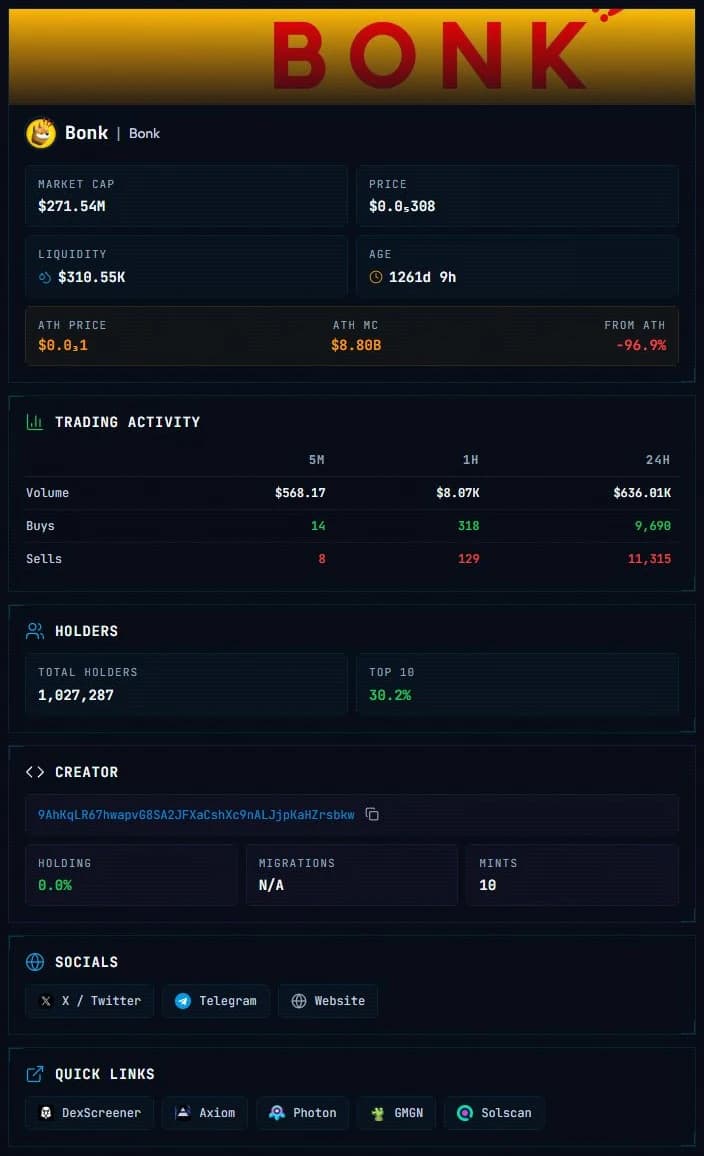
On Discord the same report is an embed with one section per group, and the footer repeats that the data is public provider data, not a security assessment.
Daily allowance
| Plan | Token Scanner runs per day |
|---|---|
| Free | 2 |
| Crab | 5 |
| Fish | 10 |
| Dolphin | 25 |
| Shark | Unlimited |
| Whale | Unlimited |
The counter belongs to your account, so Telegram, Discord and the Web Terminal spend the same runs. Telegram shows the runs left in the prompt before each scan.
Limits and edge cases
- The Token Scanner reads Solana tokens only.
- An accepted run uses its place in the allowance even when the analysis then fails, and SpyBot waits 15 seconds between two analyses on one account, whatever the tool.
- In the Web Terminal the scan starts by itself once an address is complete, and a new address starts another run. Paste a complete address once.
- A launchpad is reported only when a provider states one, and the launchpad is never deduced from the creator address.
- Active boosts here are the count the pair reports. The boost amount bought through orders is a different number, shown by the Dex Checker.
Related
- Dex Checker for the paid order record on its own.
- Top Holders to open the holders of the token you scanned.
- Tools and daily allowance for every research tool.
Last verified on October 24, 2026