
Wallet Finder
Find the wallets present in the 15 minutes before several timestamps, so one wallet appears across several tokens.
The Wallet Finder looks at the 15 minutes before each moment you give it and keeps the wallets that appear in at least two of those windows. Use it to find the wallets that were active around several launches, or around several posts.
What it answers
You give it two to five tokens on Telegram, up to ten in the Web Terminal and on Discord. Each one comes with a moment: the time of a post, or a timestamp. The tool screens the 15 minutes ending at that moment for each token, then keeps the wallets found in at least two of those windows.
A match is a candidate
A match uses the fee payer of a successful transaction and its SOL balance decrease. It does not prove who owns the wallet, and it does not prove the transaction was a buy.
Run it
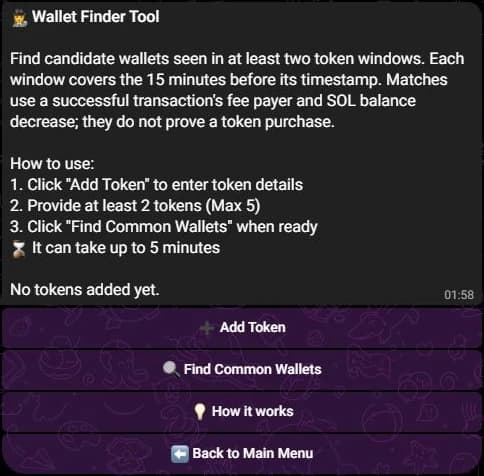
- Press 🕵️ Wallet Finder in the main menu.
- Press ➕ Add Token, then send three lines in one message: the token address, the moment, and the minimum SOL decrease.
- Repeat until you have two to five tokens, then press 🔍 Find Common Wallets.
vines1vzrYbzLMRdu58ou5XTby4qAqVRLmqo36NKPTg
https://x.com/account/status/1234567890123456789
0.5
The moment accepts an X, Discord or Telegram post link, or a Unix timestamp. The third line is optional and defaults to 0.1 SOL. 💡 How it works repeats this on the same screen.
- Type
/research finder criteria:with two to ten rows separated by;, each row being the mint, the UTC date and the optional minimum. - Or open 🧰 Tools, press 🧭 Finder, add each criterion with ➕ Add, then press 🚀 Launch once two criteria are set.
<mint> 2026-10-01 0.5; <mint> 2026-10-02T18:30ZDates are UTC, written YYYY-MM-DD or YYYY-MM-DDThh:mmZ. The minimum SOL is optional and defaults to 0.1. 🗑 Remove drops a criterion, and a draft costs nothing until you launch it.
A Discord account answers only once it is linked to a SpyBot account: /tg links a Telegram account, and /account create makes a Discord-native one.
- Open Tools, then Wallet Finder under Discovery.
- Paste the mint, then a post link or a Unix timestamp, or set the moment with the UTC Picker. Set the optional Minimum SOL Balance Decrease.
- Press Add Token. The token moves to Added tokens with its 15-minute window in UTC, and the form clears for the next one, up to ten. Editing a token you added turns the button into Save.
- Once two tokens are added, the list reads Ready to search. Press Find Common Wallets. The page shows Analyzing token 1/2... with a progress bar while it runs.
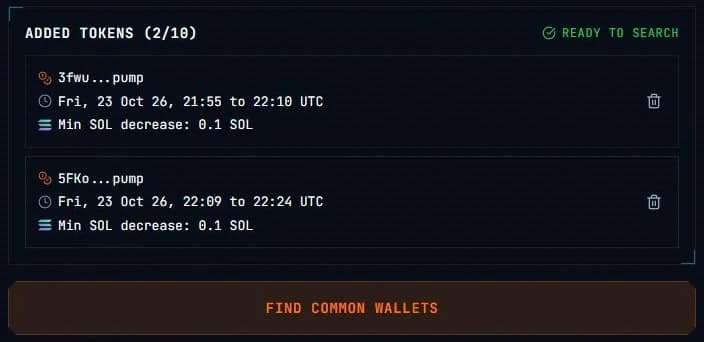
The form for the next token sits between the list and the button. It is left out here.
An X or Discord link carries its own time. A Telegram link does not, so a Telegram post needs the UTC Picker in the Web Terminal; the Telegram bot reads the post time itself.
What the report shows
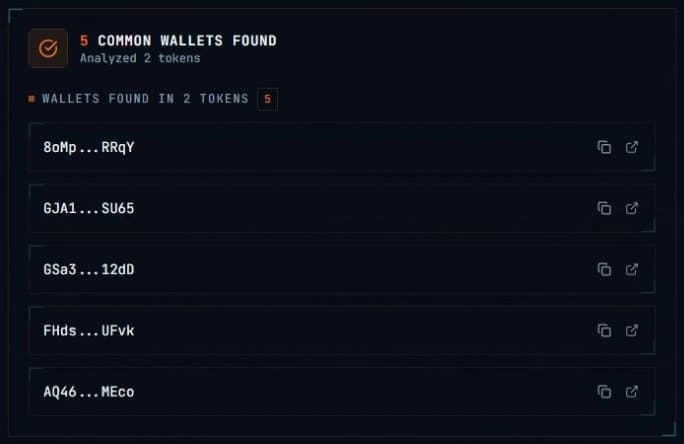
Only the candidates are returned, never the full buyer list of each token.
- On Telegram the wallets are grouped by the number of windows they matched, the strongest group first, each address a GMGN link, 20 per page with ⬅️ ➡️.
- On Discord the embed counts the candidates over the windows screened, gives one line per wallet with its address and its number of matches, then lists every window with its time and its minimum. 20 candidates per page.
- In the Web Terminal the cards are grouped by the number of matching tokens, each with a copy button and a link to open the address in an explorer.
With no match the answer says that no candidate was seen on two or more of the windows. Paging an answer never uses another run.
Limits and edge cases
- Each window covers the 15 minutes before its moment, and ends at that moment.
- The minimum is the fee payer's SOL balance decrease per transaction, fees included. It defaults to 0.1 SOL, and a higher value filters out smaller decreases.
- The tokens must be distinct. A token already in the list is refused instead of being counted twice.
- Two tokens is the minimum. Telegram stops at five tokens, Discord and the Web Terminal accept up to ten.
- A search can take up to 5 minutes. A Telegram chat runs one search at a time, and its answer stays available for 24 hours so the pages can be reopened. The Web Terminal follows a job it keeps for one hour, and paging costs nothing.
- An accepted run uses its place in the allowance even when the search fails, and SpyBot waits 15 seconds between two analyses on one account.
Daily allowance
The tool keeps its own counter: 2 runs a day on Free, 5 on Crab, 10 on Fish, 25 on Dolphin, then unlimited on Shark and Whale. Telegram, Discord and the Web Terminal share it, and checking the progress of a search does not use a run.
Related
- PnL Checker to read what a candidate wallet earns.
- Tools and daily allowance for the other research tools.
- Wallets to track a wallet you found.
Last verified on October 24, 2026