
PnL Checker
The profit and loss of a Solana wallet over 24 hours, 7 days or 30 days, counted on the tokens it first bought in the window.
The PnL Checker reads one Solana wallet and reports what the tokens it first bought in a window returned. Use it to judge a wallet you found in an alert, in Top Traders or on X.
What a window counts
A window counts only the tokens the wallet first bought inside it, measured back from the snapshot printed on the report. A token bought before the window stays out, even when the wallet sold it inside the window. The report is not a sum of every trade of the period.
One accepted analysis answers all three windows and saves them together. Reading another window, or reopening the report, costs nothing and reaches no provider.
Run it
- Press 📊 PnL Checker in the main menu. The chat states the checks left today.
- Send the Solana wallet address.
- The chat shows 🔍 Scanning Wallet Address..., then the 7D report.
- Use ⬅️ and ➡️ under the report to read 24H or 30D, ℹ️ for the guide and 🔄 Refresh to run a new analysis.
- Type
/research pnl wallet:<address>with the optionalperiodset to1d,7dor30d, andcached:trueto reopen the report you already paid for. - Or open 🧰 Tools, press 📊 PnL, pick a watched wallet or type another one, then press 🚀 Analyse.
- The period buttons re-read the same snapshot for free, and 📂 Saved snapshot reopens it later.
A Discord account answers only once it is linked to a SpyBot account: /tg links a Telegram account, and /account create makes a Discord-native one.
- Open Tools, then PnL Checker under Insights.
- Paste the wallet address, then press New analysis, or Reopen saved report to read the report already saved for your account.
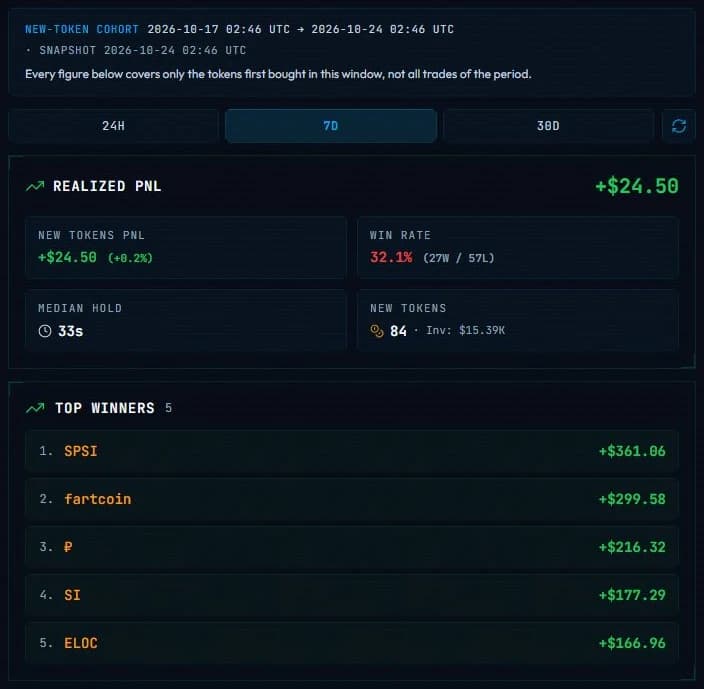
- Switch between 24H, 7D and 30D with the tabs above the figures. The refresh button beside them runs a new analysis.
What the report shows
📊 PnL Checker | 7D

💼 Wallet: <address>
🗓 Snapshot: 2026-10-24 09:12 UTC
🧬 New tokens first bought: 2026-10-17 09:12 UTC → 2026-10-24 09:12 UTC

━━━ Summary ━━━
🟢 Realized PnL: +$4.21K
🟢 New Tokens PnL: +$5.08K (+12.40%)
🎯 WinRate: 58.33% (7W / 5L)
⏱ Median Hold Time: 6.4h
🪙 Tokens: 12 | 💰 Invested: $41.00K
The values above are an example. An italic line under the window restates that every figure covers only those new tokens. Below the summary come Top winners and Top losses, five new tokens each, with the symbol linked to DexScreener, the PnL of the token and what is still held.
| Figure | What it means |
|---|---|
| Realized PnL | The provider realized result over the new tokens of the window. |
| New Tokens PnL | Realized plus unrealized over those same new tokens, with its share of the investment. |
| WinRate | Profitable new tokens against losing new tokens, with the W and L counts. |
| Median Hold Time | Median first buy to last sell among the new tokens that were sold. |
| Tokens, Invested | How many new tokens the window holds, and what the wallet put in. |
Unavailable marks a value the report could not compute. A window with no new token says so, which is different from a window of zeros. When the indexed history of the wallet starts inside the window, a warning names that date, because the beginning of the window is then not covered.
Reading a saved report
One analysis freezes the snapshot and saves it for your account for one hour. During that hour the period tabs on Telegram, the period buttons on Discord, the tabs in the Web Terminal and a reopen all read the saved snapshot, whatever app you use.
🔄 Refresh starts a new analysis and counts as a new run, and the refresh button waits 60 seconds between two refreshes of the same wallet. After the hour, the saved report is gone: Telegram keeps only 🔄 Refresh and ℹ️ under the old message, and the Web Terminal answers that no report is saved for this wallet.
Daily allowance
The PnL Checker keeps its own counter: 2 runs a day on Free, 5 on Crab, 10 on Fish, 25 on Dolphin, then unlimited on Shark and Whale. Telegram, Discord and the Web Terminal share it.
Limits and edge cases
- Solana wallets only.
- An accepted run uses its place in the allowance even when the analysis fails, and SpyBot waits 15 seconds between two analyses on one account.
- The three windows use one snapshot time, so the tabs of one report always describe the same moment.
- PnL figures depend on the provider index. A wallet that traded on a venue that index does not cover can read lower than its real result.
- A Discord report is a private answer, deferred while the analysis runs. If the account link changes during the run, the command asks you to start it again instead of showing a result.
- On Discord,
/research pnlwith anotherperiodand withoutcached:truestarts a new analysis. The period buttons of the Tools menu re-read the saved snapshot for free.
Related
- Top Traders to find wallets worth checking.
- Tools and daily allowance for the other research tools.
- Quotas and delivery limits for the alert limits of your plan.
Last verified on October 24, 2026