
Manage your wallets
List, rename, pause or delete a tracked wallet on Telegram, Discord or the Web Terminal, and read what each wallet status means.
A tracked wallet keeps its name, its status and its own filters. The three apps write the same record, so a rename or a pause made in one app appears in the other two.
List your wallets
- Press 📝 List, or send
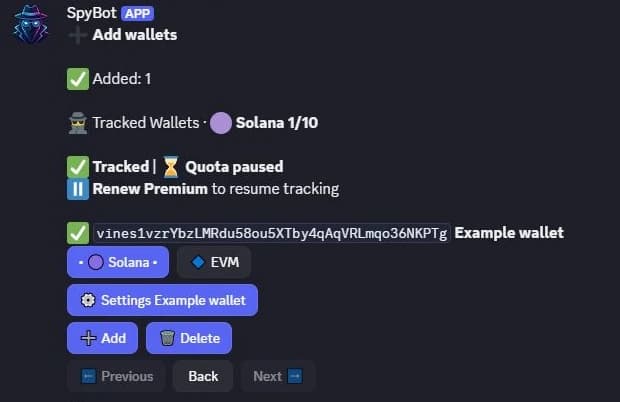
/list. - The arrows above the addresses switch between the 🟣 Solana list and the 🔷 EVM list. The middle button shows the list you are in.
- Each line starts with a status emoji, then the address, the name and 👀 with the number of SpyBot users tracking that wallet.
- Type
/wallets. - Each entry shows the wallet, its chain and its status.
/wallet statusreturns your most recent wallet request with its receipt.
- Open Wallets.
- Search, filter by chain and pick the columns you want to see.
- Press the settings icon in the Action column (Wallet Settings) to open one wallet.
Rename a wallet
- Right after adding a wallet without a name, press 📝 Add name and send the label.
- Later, send
/addagain with the address and the new name on the same line. A known address sent with a name is a rename. - A name holds up to 25 characters.
- Type
/wallet rename. - Give the
address, thename(1 to 25 characters) and, when the address is tracked on several EVM chains, thechain. - Submit. The label changes in Discord, Telegram and the Web Terminal.
- Open Wallets, then the settings icon of the wallet.
- Press the pencil next to the wallet name (Rename wallet).
- Type the name, up to 25 characters, then press Enter or the check button. Escape cancels.
Pause or resume alerts
A paused wallet stays tracked with its name and filters, and its history is kept. Only its future alerts stop arriving. An alert already on its way can still land.
- Open ⚙️ Settings under the wallet in the list.
- Press ⏸️ Pause Tracking, or ▶️ Resume Tracking when the wallet is already paused.
- Type
/wallet pauseor/wallet resume. - Give the
addressand, when needed, thechain. - Submit. The state is shared with the other apps.
- Press Pause or Resume in the row of the wallet.
- To change several wallets at once, tick them and use Pause selected wallets or Resume selected wallets.
Delete a wallet
- Press 🗑️ Delete, or send
/delete. - Send the addresses to remove, one per line.
- Press DELETE ALL and then CONFIRM DELETE ALL to remove every wallet at once.
- Type
/wallet remove. - Give the
address, typeREMOVEin theconfirmoption and, when needed, thechain. - Submit and read the receipt.
- Press Delete in the row of the wallet.
- To remove several wallets, tick them and press Delete selected wallets.
- Confirm in the dialog. The removal cannot be undone.
Deleting removes the tracking entry with its name and filters. An address that is also a member of a Multi Wallet Tracker or of the Holding Tracker keeps that membership. See Multi-Wallet Tracker and Holding Tracker.
What each status means
| Status | Where you see it | What it means |
|---|---|---|
| ✅ Tracked | Telegram list, Web status legend | SpyBot watches the wallet and sends its alerts. |
| ⏸️ Paused | All three apps | You paused the wallet, or a plan change did. Alerts stop until you resume it. |
| ⌛ Quota paused | Telegram list and ⚙️ Settings, Web legend | The account reached its alert quota, so SpyBot paused the wallet. Its ⚙️ Settings shows no Pause or Resume button, and the wallet resumes by itself when the quota resets. |
| 🚫 Blacklisted | Telegram list only | The address is on SpyBot's spam list. SpyBot sends no alert for it, and lists it after the other wallets. |
Export your wallets
The Web Terminal exports the whole list as a CSV file. Press Export CSV above the table: the file is named wallets.csv and holds the columns Name, Address, Status and Chain, one wallet per line. Telegram and Discord have no export.
Related
Last verified on October 24, 2026
Add wallets
Add one wallet or up to 50 at once on Telegram, Discord or the Web Terminal, name them, and let SpyBot detect the chain.
Solana and EVM addresses
SpyBot detects each address's chain. One 0x address covers Ethereum, Base, Robinhood Chain and BNB Smart Chain and counts once. Polygon follows Polymarket traders.