
EVM filters and protocol groups
Set what an EVM chain alerts on, from transfers and trades to approvals, DeFi activity and spam, and pick the protocol groups of that chain.
Each of the five EVM chains has its own settings screen. It decides which moves on that chain alert you, and which protocols count. Use it when a chain sends too much of one kind of transaction, or when a wallet you follow lends, stakes or bridges.
This page covers the EVM screens. The Solana screen and the switches every chain shares are on Notification filters. The rarer Solana filters are on Advanced and platform filters.
One screen per chain
Press ⚙️ Settings, then move with ⬅️ and ➡️ until the chain you want is in the header: 🟣 Solana, 🔷 Ethereum, 🔵 Base, 🟢 Robinhood, 🟡 BNB Smart Chain, 🟪 Polygon. Every row below applies to that chain alone. One address can be tracked on Ethereum and on Base with different filters.
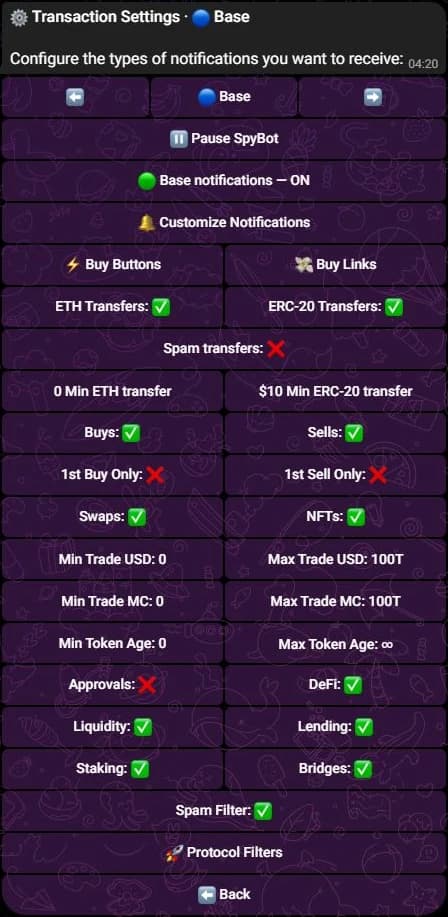
The Base settings screen on Telegram. These values are an example.
Transaction types
| Row | Alerts on | Default |
|---|---|---|
| ETH Transfers (BNB Transfers on BNB Chain, POL Transfers on Polygon) | Sending or receiving the native coin of the chain. | On |
| ERC-20 Transfers | Sending or receiving a token. | On |
| Spam transfers | Token transfers SpyBot suspects are unsolicited: promotional airdrops and the dust of an address-poisoning attempt. | Off |
| Buys | A BUY on a DEX of that chain. | On |
| Sells | A SELL. | On |
| 1st Buy Only | Only the first buy of that token by that wallet. | Off |
| 1st Sell Only | Only its first sell. | Off |
| Swaps | A token for a token move, and wraps or unwraps. | On |
| NFTs | ERC-721 and ERC-1155 activity. | On |
The EVM screens have no Jupiter Perps or Jupiter DCA row: those two exist on Solana only.
Amounts and token age
Two minimums ignore small transfers: a native amount, typed in ETH, BNB or POL, and a USD value for ERC-20 transfers. Both start at 0. Trades then follow Min Trade USD, Max Trade USD, Min Trade MC, Max Trade MC, Min Token Age and Max Token Age, which start at 0 and no ceiling. The meaning is the one described on Notification filters.
Approvals
Approvals starts off. Switched on, it alerts you when a wallet grants an ERC-20 allowance, with the spender and the amount, Unlimited for an unbounded allowance, and Revoked when an allowance is withdrawn. Most wallets never grant one, which is why the row starts off.
The DeFi group
DeFi is the master switch of DeFi activity and it is on. It covers four rows, all on:
| Row | Types |
|---|---|
| Liquidity | ADD LIQUIDITY, REMOVE LIQUIDITY |
| Lending | SUPPLY, WITHDRAW, BORROW, REPAY |
| Staking | STAKE, UNSTAKE |
| Bridges | BRIDGE, a move to another chain |
Switch DeFi off and all four stop alerting, whatever their own state. Their values are kept, so the choices come back with DeFi.
Spam transfers and Spam Filter
Two rows work together. Spam transfers is off: while it is off, a transfer SpyBot reads as spam stays hidden. Spam Filter is on and runs after every other switch: it drops any alert that carries a risk flag. To see every transfer, switch Spam transfers on and Spam Filter off.
The checks behind these two rows, and the Solana spam switch, are on Advanced and platform filters.
Protocol groups
Press 🚀 Protocol Filters on the chain screen. Each group switches every protocol inside it at once. A group reads ✅ only when all of its protocols are on, and a protocol switched off drops the alerts of that platform.
| Chain | Groups |
|---|---|
| Ethereum | 11: Uniswap, 1inch, 0x, CoW Swap, Balancer, Curve, SushiSwap, Aave, Compound, Lido, Across |
| Robinhood Chain | The same 11. |
| Base | 12: the same 11 and Aerodrome. |
| BNB Chain | 14: the same 11, PancakeSwap, Four.meme and Flap. |
| Polygon | 14: the same 11, QuickSwap, KyberSwap and ParaSwap. |
Uniswap covers Uniswap V2, Uniswap V3, the Uniswap Universal Router and Uniswap V3 Positions. Lido covers Lido, Lido wstETH and Lido withdrawals. PancakeSwap covers V2, the Universal Router, the Infinity Router and Permit2. QuickSwap covers V2, V3 and V3 Positions. All groups start on, and a transaction SpyBot cannot tie to a known protocol still reaches you.
Polymarket on Polygon
Polymarket is not a protocol group. The Polygon screen ends with 🎯 Polymarket, which holds the platform switch and one switch per Polymarket move, from buys and sells to rewards. The Polygon screen has no ⚡ Buy Buttons or 💸 Buy Links row, since no trading bot supports Polygon. See Polymarket traders.
Display on the same screen
🔔 Customize Notifications opens the display switches of the chain. Two of them exist on EVM chains only: 📈 Market Data, on, adds the market cap, the liquidity, the token age and the unit price, and ⛽ Gas Details, off, adds the fee the tracked wallet paid. Display options lists every switch and the line it hides.
Where the same switches are
- Discord: open the chain tab (🔷 ETH, 🔵 BASE, 🟢 RH, 🟡 BSC, 🟪 POL), then a heading. Alert types holds the transaction types, approvals, the DeFi rows and the spam filter, where they read Approval notifications, DeFi notifications and Spam filtering. Thresholds holds the amounts, Protocol groups the protocols and Display switches the display options. A DeFi row shows ⚫ while DeFi notifications is off. The 🟪 POL tab adds 🎯 Polymarket.
- Web Terminal: open Settings, choose the chain with the arrows, then Transfers, Core Transactions, DeFi Activity, Notification Display & Protection and Protocol Filters. Approvals read Token Approvals and the spam filter Anti-spam. On Polygon, a Polymarket row above the protocol filters opens its switches.
Related
- Notification filters: the trade and transfer switches of every chain.
- Advanced and platform filters: the spam checks and the Solana-only switches.
- Display options: what each alert line shows.
- EVM tokens: quick-buy links: the buttons under an EVM alert.
- Chains.
Last verified on October 28, 2026
Where alerts arrive
Your Telegram private chat or a linked group, your private Discord channel, or the Web Terminal feed with sound and no push notifications.
Display options
Choose the lines an alert carries, from the summary and the position block to the token address, the image, and the gas and market data of an EVM chain.