
Accumulation alerts
Alert when your tracked wallets together buy a token past a USD threshold inside a window, and still hold part of it.
Accumulation alerts tell you when your tracked wallets together buy more of a token than your USD threshold, inside a time window. Use it to spot a position being built across several addresses instead of waiting for one large buy.
How a token qualifies
SpyBot adds the buys your tracked wallets make on the same token inside the window, then checks four conditions:
- The total buy volume reaches your Volume Threshold.
- The number of separate buys reaches your Minimum Buys.
- The wallets still hold the Min Hold % of what they bought.
- The token is not a stablecoin you chose to hide.
One wallet can pass the threshold on its own. You do not keep a separate list for accumulation: it uses the wallets you already track.
Threshold: $500 · Minimum buys: 2 · Window: 6 hours
Wallet A buys $300
Total $300 · 1 buy · no alert yet
Wallet B buys $250
Total $550 · 2 buys · alert
- 6-hour window
- Wallet A: $300
- Wallet B: $250, total $550
Settings
| Setting | Default | Range | What it does |
|---|---|---|---|
| Volume Threshold | $100 | From $1 | Minimum total amount bought on the token. |
| Time Window | 360 minutes (6 hours) | 1 to 525,600 minutes (365 days) | Span in which the buys are added up. |
| Minimum Buys | 1 | 1 to 100 | Separate buy transactions needed on the token. |
| Min Hold % | 25% | 1 to 100 | Share of the bought position the wallets must still hold. |
| Match Type | Once | Once or Every | Whether a token can alert again. |
| Stablecoins | Hidden | Hidden or visible | Leaves USDC, USDT and USD1 out of the count. |
Accumulation runs on Solana and on Ethereum, Base, Robinhood Chain, BNB Smart Chain and Polygon. On Polygon it adds up token buys: a Polymarket trade never counts.
Once or every time
- Once sends one alert per token, which suits discovery. Switching back to Once clears the list of tokens already alerted, so those tokens can alert again.
- Every sends an alert each time the conditions are met again, which suits a position you monitor.
Set it up
- Press 🧲 Accumulation in the main menu.
- Press 🧲 Accumulation: OFF ❌ to switch it on.
- Press 💰 Min Total USD, then a preset or 🔧 Custom, and send the amount.
- Press ⏰ Time Window, then a preset from 1h to 365d, or 🔧 Custom in minutes.
- Press 🔢 Min # Buys and 📊 Min Hold % to set the two remaining conditions.
- Press 🔄 Match Type to choose Once or Every time.
- Press 🪙 Stables ❌ to leave stablecoins out, or 🪙 Stables ✅ to include them.
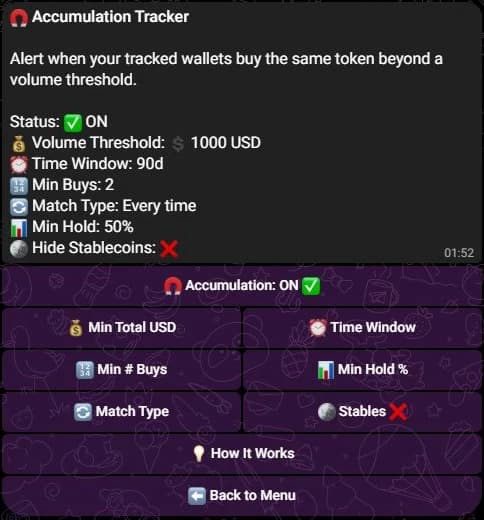
This tracker uses custom values. A new one starts with the defaults in the table above.
- Type
/acc-config viewto read the saved settings. - Change one with
/acc-config set key:volumeThresholdUSD value:100. The other keys aretimeWindowMinutes,minBuys,minHoldPercentage,matchType(onceorevery) andhideStablecoins(trueorfalse). - Switch the tracker on with
/acc-control set state:on. - Type
/acc-control resetto clear the tokens already alerted in Once mode.
- Open Tools, then Accumulation Tracker under Tracking.
- For Volume Threshold, Time Window, Minimum Buys and Min Hold %, press a preset or enter a custom value.
- Choose Once or Every under Match Type.
- Switch the tracker on. Each change is saved as you make it.
In Once mode the page shows a Reset button, with the number of tokens it will clear, that empties the list of tokens already alerted. Alerts you already received stay in your history.
Edge cases
- A change to the settings applies to the next buys SpyBot sees. An alert already queued can still arrive.
- The threshold counts buys only. A token that was bought long ago and held does not alert on its own.
- Turning the tracker off keeps every setting, so you can switch it back on later.
Related
- Multi-Wallet Tracker for a count of wallets instead of a volume.
- Holding Tracker for wallets that keep a token after they buy it.
- Filters to narrow which alerts reach you.
Last verified on October 28, 2026