
Add wallets
Add one wallet or up to 50 at once on Telegram, Discord or the Web Terminal, name them, and let SpyBot detect the chain.
Paste any Solana or EVM address and SpyBot recognizes the chain on its own. You can add up to 50 wallets in one go and name each one, so your alerts show a name you recognize instead of a long address. To follow a Polymarket trader, paste their profile link instead: see Polymarket traders.
Steps
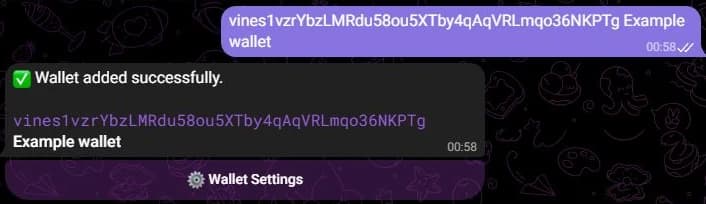
- Press ➕ Add in the main menu, or send
/add. - Send the addresses, one per line. To name a wallet, add a space and the name after its address.
- SpyBot confirms each wallet it adds.
- Open your menu with
/start, then press ➕ Add wallet and Enter wallet addresses. - In the form, paste the addresses, one per line, with an optional name after each.
- Submit. SpyBot confirms and shows the wallet with its status.
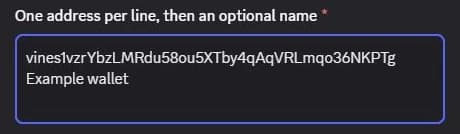
You can also add a single wallet with the /wallet add command and its address and name options.
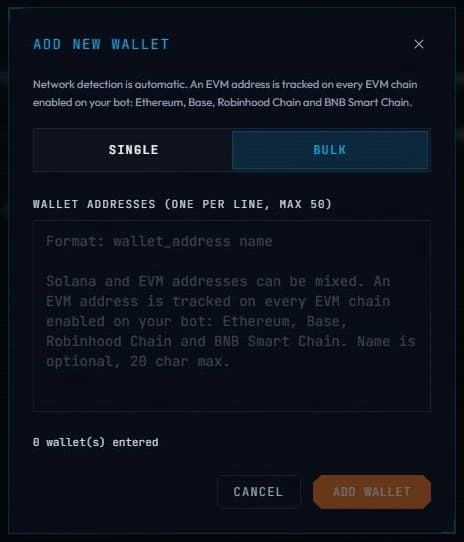
- Open Wallets and press + Add wallet.
- Use Single for one address and an optional name, or Bulk for up to 50 addresses, one per line.
- Press Add wallet.
Solana and EVM addresses
- A Solana address, such as
vines1vzrYbzLMRdu58ou5XTby4qAqVRLmqo36NKPTg, is tracked on Solana. - An EVM address starts with
0x. SpyBot tracks it on Ethereum, Base, Robinhood Chain and BNB Chain at once, and it counts as a single address in your plan. - A Polymarket profile link,
polymarket.com/@handleorpolymarket.com/profile/0x…, adds the trader's wallet on Polygon, named after the trader. It counts as one EVM address. In the Web Terminal, use the Single tab.
Names
A name replaces the address in your alerts and lists. It is optional and can be up to 25 characters on Telegram and Discord, or 20 characters on the Web Terminal.
Limits by plan
| Plan | Solana wallets | EVM addresses |
|---|---|---|
| Free | 10 | 10 |
| Crab | 50 | 30 |
| Fish | 100 | 60 |
| Dolphin | 200 | 125 |
| Shark | 500 | 250 |
| Whale | 1,000 | 500 |
Solana wallets and EVM addresses have separate limits. See pricing for everything each plan includes.
If a wallet is refused
- Invalid address: check that you copied the whole address, with no extra characters.
- Plan limit reached: remove a wallet you no longer need, or upgrade your plan.
- Too active for your plan: some wallets make so many transactions that they would use up your alert quota within minutes. SpyBot refuses them on plans that cannot keep up.
Alerts from a newly added wallet can take a few seconds to start.
Last verified on October 28, 2026
One account, three apps
One SpyBot account holds your wallets, filters, language, trading wallet and plan, and opens from Telegram, Discord or the Web Terminal.
Manage your wallets
List, rename, pause or delete a tracked wallet on Telegram, Discord or the Web Terminal, and read what each wallet status means.