
Multi-Wallet Tracker
Get one alert when several of your tracked wallets buy the same token inside a time window, on Solana or on an EVM chain.
The Multi-Wallet Tracker alerts you when several of your tracked wallets buy the same token inside a time window. Use it to catch a group of smart wallets buying together, without reading every single alert.
What it detects
You give a tracker a list of wallets. When enough different wallets on that list buy the same token within your window, SpyBot sends one alert with the token and each buyer.
- Repeated buys by one wallet count as one buyer. A single wallet cannot trigger an alert on its own.
- A buy counts from $0.50.
- Each tracker follows one chain: Solana, Ethereum, Base, Robinhood Chain, BNB Smart Chain or Polygon. It only counts wallets on that chain.
- On Polygon a tracker counts token buys. A Polymarket trade never counts.
You can run several trackers, called slots, and link trackers of the same chain so their wallets count together. A linked group keeps the trigger and the window of the tracker you open.
Slots and members by plan
| Plan | Slots | Wallets in each slot | Wallets in total |
|---|---|---|---|
| Free | 1 | 30 | 30 |
| Crab | 2 | 30, 30 | 60 |
| Fish | 3 | 30, 30, 40 | 100 |
| Dolphin | 3 | 30, 30, 40 | 100 |
| Shark | 4 | 30, 30, 40, 50 | 150 |
| Whale | 5 | 30, 30, 40, 50, 100 | 250 |
Slots are counted for each chain. On the Free plan you can run one Solana tracker with up to 30 wallets and one Ethereum tracker with up to 30 wallets.
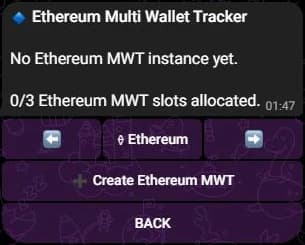
Each chain has its own slots. On a Fish plan, that is 3 per chain.
Trigger
The trigger is the number of different wallets that must buy the same token. It goes from 2 to 10 and starts at 2.
Time window
The window is the span the buys may be spread over. It goes from 1 minute to 1,440 minutes (24 hours) and starts at 120 minutes (2 hours).
Trigger: 3 wallets · Window: 120 minutes
Wallet A buys
8:30 · too early to count
Wallet B buys
10:00
Wallet C buys
10:45
Wallet D buys: alert
11:30 · 3 wallets in 90 min
- 120-minute window
- Counted buy
- Not counted
- Alert sent
Filters
Each chain has its own filters, shared by every tracker of that chain:
| Filter | Default | Effect |
|---|---|---|
| Min purchase USD | 2 | Ignores wallets that spend less than this on the token. |
| Min trade MC | 0 | Ignores tokens below this market cap. |
| Max trade MC | 0, which means no ceiling | Ignores tokens above this market cap. |
Filters never change your tracked wallets or your normal alerts.
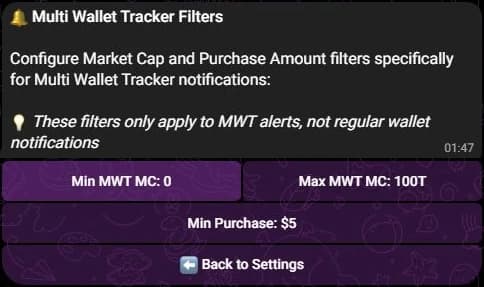
Telegram keeps these filters under Settings, then Multi Wallet Tracker Filters. The values shown are an example.
Set it up
- Press 🔔 Multi Wallet in the main menu, or send
/mwt. - Move between chains with ⬅️ and ➡️, then press ➕ Create Solana MWT on your first visit.
- Press ➕ Add and send the wallet addresses, one per line.
- Press ⚡ Trigger: 2, then send a number from 2 to 10.
- Press ⏳ Time Window: 2 hours, then send a number of minutes from 1 to 1,440.
- Press 🎚 Solana MWT Filters to set the purchase amount and the market cap bounds.
- Press MWT 1: On/Off: ❌ to switch the tracker on.
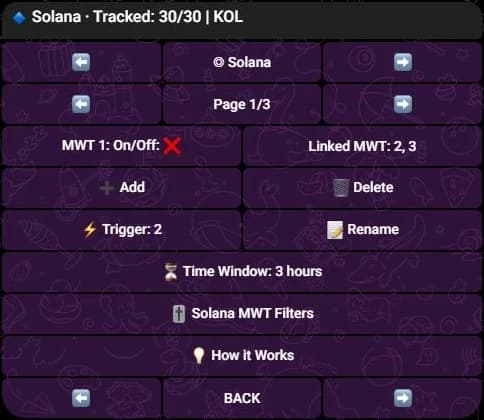
The tracker's wallets are listed above these buttons. They are hidden here.
- Type
/mwtto see your slots. - Create one with
/mwt-slot create, empty and switched off. Add thechainoption for Ethereum, Base, Robinhood Chain, BNB Smart Chain or Polygon; Solana is the default. - Add wallets with
/mwt-wallet add, with the slot number and the addresses to paste. - Set the trigger and the window with
/mwt-config set key:triggerNumber value:3and/mwt-config set key:timeWindowMinutes value:60. - Set the filters with
/mwt-filter, then switch the tracker on with/mwt-state set slot:1 state:on.
- Open Tools, then Multi Wallet Tracker under Tracking.
- Pick the chain with the arrows, then press the Create button, which names the chain you chose.
- Press Add Wallet and paste the addresses.
- Press Configure, set Trigger Count from 2 to 10 and Time Window from 1 to 1,440 minutes, then Save Changes.
- In the same window, set Min purchase USD, Min trade MC and Max trade MC.
0means no ceiling. - Switch the tracker on with its toggle.
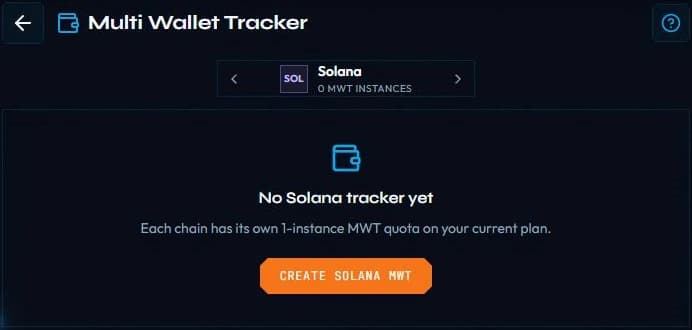
When a Discord account is linked to Telegram, every /mwt command needs its own permission, granted from Telegram with /discord.
What the alert looks like
The alert names the token and each buyer, with what that wallet spent, its buys, its bag, the market cap of its first buy and the time of its last buy.
🔔 3 Wallets bought TOKEN | Multi Wallet Tracker 1

🔹 Wallet A: $412 | 2 buys | 💰 Bag: 1.2M TOKEN
📊 First buy at $180K MC
🕒 Last buy: 2m ago

🔹 Wallet B: $260 | 1 buy | 💰 Bag: 900K TOKEN
📊 First buy at $195K MC
🕒 Last buy: 1m ago

💲 Price: $0.0021 | 💰 MC: $210K

📊 Dexscreener | Photon | GMGN | BullX
The same alert reaches your Telegram chat, your Discord alerts channel and the Web Terminal feed. On Discord it opens with the tracker name and a totals line, then one block per wallet, up to 10 wallets.
Start small
Link two or three wallets you already trust and keep the trigger at 2 or 3. Raise it when the alerts come too often.
Related
- Accumulation alerts for total volume instead of a head count.
- Holding Tracker for wallets that keep what they bought.
- Filters for every other alert.
Last verified on October 28, 2026