
Buy buttons and trading-bot links
Trade a Solana token from the alert, or open it in Axiom, BullX, Photon, GMGN, Terminal, Bloom and the other bots SpyBot supports.
Every trade alert ends with a way to act on it. On Solana, SpyBot trades from your own wallet. On every chain you can open the token in a trading bot you already use, in one tap.
BUY and SELL from SpyBot
The BUY and SELL buttons spend from your SpyBot wallet through Jupiter, with a 1% fee and 33% default slippage. They show on Solana alerts only, under a BUY, SELL, SWAP, migration or token creation.
| App | Default buttons | Limit |
|---|---|---|
| Telegram | BUY 0.1 SOL, SELL 100% | 4 in total, 2 per side |
| Discord | BUY 0.1 SOL, BUY 0.25 SOL, BUY 1 SOL, SELL 50%, SELL 100% | 5 in total, 3 per side |
In the Web Terminal the same wallet opens in a trade panel from the alert details. The Web Terminal asks you to authorize the browser the first time, within 10 minutes of signing in, before it can trade.
Change these values in the in-app trading settings, see Trading settings.
Trading-bot buttons
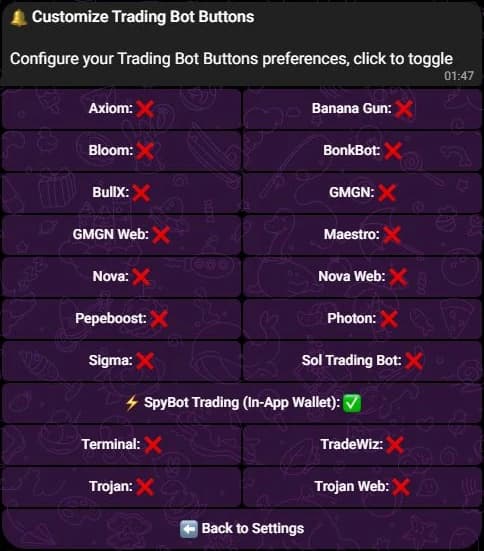
⚡ Buy Buttons adds one button under the alert for each bot you switch on. On Telegram the screen also carries a full-width ⚡ SpyBot Trading (In-App Wallet) row, which turns the in-app buttons on or off.
The Solana list includes Axiom, BullX, Bloom, Photon, Trojan, Nova, Nova Web, BonkBot, Maestro, Banana Gun, Sol Trading Bot, Pepeboost, Sigma, TradeWiz and Terminal, the bot also known as Padre. Every button opens the token page of that bot.
On the EVM chains the list is shorter and set per chain, see the table below. Polygon has none.
Buy links inside the alert
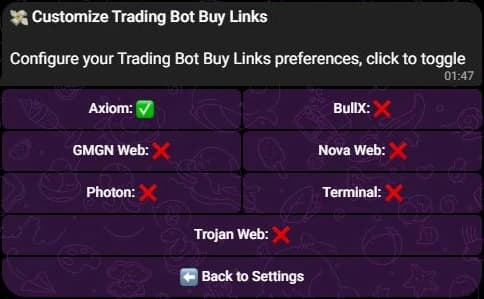
💸 Buy Links adds ⚡ Bot: address lines at the end of the alert, one per bot, each with its full URL. They help when you read on a device where you cannot tap a button.
On Solana, seven bots offer a link: Axiom, BullX, Photon, Nova Web, GMGN, Terminal and Trojan. The Web Terminal calls the last two GMGN Web and Trojan Web. Axiom is on by default and the others are off.
On an EVM chain the only link on by default is GMGN.
Trading bots on an EVM chain
EVM alerts carry quick-buy buttons and buy links for the bots below. The button and the link are separate switches.
| Bot | Chains | Button | Link |
|---|---|---|---|
| GMGN | Ethereum, Base, Robinhood Chain, BNB Chain | Yes | On by default |
| Banana Gun | Ethereum, Base, BNB Chain | Yes | Yes |
| Terminal | Ethereum, Base, Robinhood Chain, BNB Chain | Yes | Yes |
| Axiom | Robinhood Chain, BNB Chain | Yes | Yes |
| Bloom | Ethereum, Base, Robinhood Chain, BNB Chain | Yes | No |
| Maestro | Robinhood Chain | Yes | No |
| Sigma | Robinhood Chain | Yes | No |
An EVM alert shows at most two quick-buy buttons, on one row, under a BUY, SELL or SWAP of a token. A native coin transfer and an NFT alert carry none. SpyBot does not trade EVM tokens itself.
No trading bot supports Polygon: a Polygon alert carries no quick-buy button or link, and the Polygon settings have no ⚡ Buy Buttons or 💸 Buy Links row.
Where to choose them
- Press ⚙️ Settings.
- Choose the chain.
- Press ⚡ Buy Buttons or 💸 Buy Links, then press a bot to switch it.
- Open ⚙️ Settings.
- Press ⚡ Buy Buttons on the chain you want, then pick the bots in the list. Discord keeps one bot list per chain for the buttons, and the same screen leads to its BUY and SELL presets.
- Open Settings.
- Press Buy Buttons or Buy Links.
- Select the bots. The page counts your active choices.
Limits worth knowing
- Buttons work in a private chat. A Telegram alert forwarded to a group through
/channelarrives without its buttons, so trade from your private chat with the bot. - Each bot you switch on adds a button to every Solana trade alert on Telegram. Discord keeps the whole row to five buttons, so the presets shrink as bots are added.
- The AXI, PH and GM links inside the links line of a Solana alert always show. They are part of the alert, while 💸 Buy Links governs the separate
⚡lines below it. - No buttons without a tradeable token. A pure SOL transfer has nothing to buy.
Related
- Buy from an alert: the one-tap flow and its receipt.
- Your SpyBot wallet.
- Where alerts arrive.
Last verified on October 28, 2026
Advanced and platform filters
Create Token, creator fees, cashback, bridges, FOMO bridges, spam, launchpad filters, Meteora DLMM, DefiTuna and the EVM protocol filters.
Pause alerts
Stop every alert with one switch, pause a single chain, or pause Discord delivery, and know what happens to the alerts already queued.